Showing posts with label lightweight linux. Show all posts

Friday, January 11, 2013

Bodhi Linux 2.2.0 Review: Better than ever bleeding edge Ubuntu LTS!

Bodhi Linux always has a special place in my Linux OS repertoire for being one of the most lightweight Ubuntu derivatives with Enlightenment 17 as the desktop manager. Another fantastic aspect about Bodhi is "semi-rolling release". In nutshell, it means that though the distro is based on Ubuntu LTS but all major packages are backported to their latest versions available. For example, users of Ubuntu 12.04.1 LTS are still stuck with Linux kernel 3.2 and antiquated softwares like GIMP 2.6 and LibreOffice 3.5. But, Bodhi users will have their Linux kernels updated to 3.7.0, LibreOffice to 3.6 and will be using the highly acclaimed GIMP 2.8. In fact 3.7 kernel is not even there in Ubuntu 12.10! So, you can imagine the advantages of using Bodhi Linux! This is one of the many reason why I like Bodhi Linux and I call it the "Bleeding Edge Ubuntu".

From Bodhi Linux 2.2.0
Previously I had positive feedback of the 2.0.0 version and once the Distrowatch release note came out of the 2.2.0 version, I was eager to try it out and test the enhancements made.

In short, the new Bodhi 2.2.0 has now two different versions - one for old machines, the 32-bit non-pae version with Linux kernel 3.2.0 and the other, for more advanced machines - 32-bit pae and 64-bit versions with the latest Linux kernel 3.7.0. The 32-bit pae version can run well on a 64-bit machine too. I downloaded the 32-bit pae ISO, 567 MB in size.

From Bodhi Linux 2.2.0
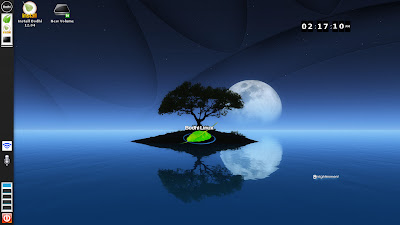
First, I did a live-boot and went for installation on my Asus K54C laptop, 2.2 Ghz Core i3 processor, with 2 GB RAM. In live-boot, I selected the Composite option and chose the Moonlight theme. To my surprise I was greeted with a very attractive looking desktop, with a kind of Ubuntu-ish left hand side strip! Bodhi Linux never looked so shiny and good!

From Bodhi Linux 2.2.0
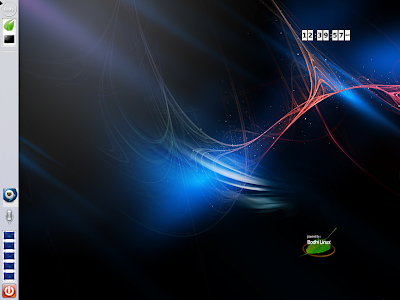
I checked the other themes as well, and all of them looked quite catchy. This is definitely a great development from Bodhi - Enlightenment never looked so compelling in any other OS, I am sure!

From Bodhi Linux 2.2.0
On hardware detection, Bodhi 2.2.0 worked as expected - Wifi detected with ease, sound card worked perfect, touchpad worked good. EFM (Enlightenment File Manager) is the default option for browsing files and it is fast to use. The distro felt really smooth to use and lightweight with a very attractive GUI.

From Bodhi Linux 2.2.0
Applications
At 567 MB sized ISO and being a past user of Bodhi, I knew what to expect in applications section. It is a shell which Bodhi provides with very minimal applications like Midori browser, Leafpad, LXterminal and a screenshot. Of course, there are quite a few themes provided for E17 desktop alongside.


From Bodhi Linux 2.2.0
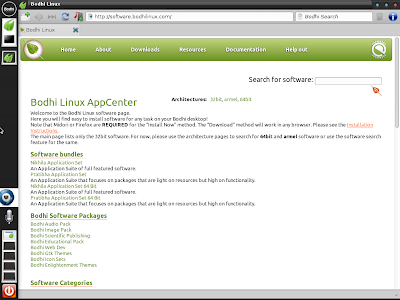
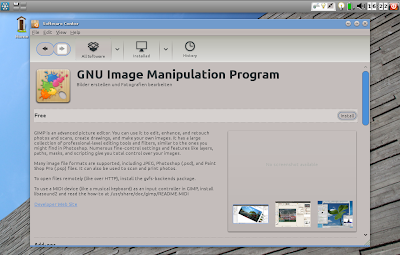
The best part I like about this release, is the offline guide provided on how to set up Bodhi and install applications. It is very handy for any new user. I could browse and install the Nikhila package from Bodhi AppCenter. Almost all daily use packages, plus flashplugin and multimedia codecs are given there and are very easy to install.

From Bodhi Linux 2.2.0
Settings manager is a bit different in E17 and it takes a bit of time to get familiar with all the options. However, one familiar, I found it actually quite easy to use and change the look and feel.

From Bodhi Linux 2.2.0
Installation
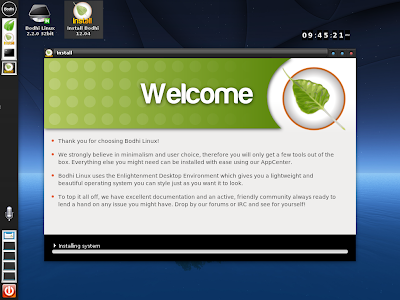
Installation is just like Ubuntu and doesn't take more than 30 minutes. The steps are given below as pictures and I could install the OS in my first attempt.

From Bodhi Linux 2.2.0
Repository
As mentioned, Bodhi has it's own application sets (Bodhi AppCenter) plus it sources from Ubuntu repository. Applications can also be installed through synaptic package manager, given by default in the ISO.

From Bodhi Linux 2.2.0
AppCenter too has bundles like Nikhila and Pratibha for the user which packs the commonly used apps to be downloaded together. Nikhila is for full featured software and Pratibha comprises of lightweight apps. Both direct installation and download option, to install later, are available. Further, Bodhi has audio, video, publishing, education, graphics, etc. packages bundled separately. I really like the bundled application option provided, as it makes life easier for a new user.

Performance
Bodhi, as expected, consumes very little RAM to run. I didn't see any system monitor or task manager with the installed ISO. Hence, I downloaded the Gnome System Monitor by typing sudo apt-get install gnome-system-monitor in the terminal.

System monitor showed RAM usage of about 80 MB to load the desktop with system monitor running, of course! However, I noted a bit high CPU usage (about 8-20%). Normally CPU usage of installed Linux distros range between 1-10%. Further, to cross check, I booted Bodhi 2.2.0 on a netbook (Asus 1101HA EeePC, 1.33 Ghz Intel Atom with 1 GB RAM). It showed there too a bit high CPU usage, abnormal for a lightweight OS. Later, I confirmed that it is due to compositing. Selecting a different desktop theme, like desktop or fancy, brings it down to normal level. So, no worries there!

From Bodhi Linux 2.2.0

Presentation and Offline Mode
Before I forget, there is another notable add-on - presentation mode. I normally like to watch movie or read books on my laptop and screensavers act as continuous irritation till I disable them. Now, Bodhi has a good way out. If the screensaver appears and is immediately turned off, Bodhi provides an option to go to the presentation mode! Highly functional and appreciated! You can also select presentation mode via Menu -> Settings -> Modes -> Presentation Mode.

Another good option is Offline Mode. It stops modules that pool network resources and is handy to increase download speed if you are downloading something. Again a handy option to have and is well appreciated.

Overall
Without any doubt, Bodhi 2.2.0 is a remarkable improvement over Bodhi 2.1.0. Enlightenment 17 never looked so enticing on any other Linux OS and Bodhi never looked so attractive. Bodhi is buttery smooth to use, runs super fast, provide all essential functionalities and has a rich repository. Further, presentation and offline mode are two utilities which increase the functionality of the distro.

Moreover, Bodhi is always ahead of even Ubuntu 12.10 in terms of providing the latest of the Linux packages and softwares. Even this release is not an exception and provides the latest Linux kernel and softwares to the users without compromising on stability, and possibly, one of the reasons for me to like Bodhi Linux and why any Linux enthusiast should try Bodhi out. It is truly bleeding edge Ubuntu LTS!

I definitely rate this release of Bodhi as the best one I have seen for any E17 Linux OS. If you are looking for a lightweight distro, look no further than Bodhi Linux 2.2.0, possibly one of the best releases of 2013.

You can download Bodhi Linux 2.2.0 from here.

20th Jan 2013: One small addition, I have been using Bodhi 2.2.0 for last few days on one of my netbooks with 1.33 Ghz Intel Atom processor and 1 GB RAM. It is fast, slick and offers some very good looking desktop interfaces. However, the E17 file manager is a real pain and doesn't offer full range of functionalities. So, I downloaded Thunar from Ubuntu repo and made it the default file manager. Other than that, I didn't have any issue with Bodhi. It is buttery smooth to use and incredibly fast!

Read more!

Saturday, September 22, 2012

Snowlinux 3 E17 Crystal Review: Fast, very fast!

The world of preferred Linux window manager is dominated by Gnome, KDE, XFCE and LXDE primarily. About 90% of the new releases I see are based on either of the four desktops because of the extremely elegant graphical interfaces they offer. However, with changing priorities and a need to provide aesthetically pleasing visual effects, Linux world is also undergoing tremendous transformation, specially Gnome 3. Most of the today's highly sophisticated Linux distros no longer run well on low resource environment or support desktops less than 512 MB RAM.

From Snowlinux 3 e17 Crystal
However, there are some competing window managers who are trying to make a mark by proving ultra-lightweight desktop environments like Enlightenment, IceWM, JWM, Fluxbox, etc. Macpup, Puppy and Bodhi, I know, leverage these lightweight window managers to give very functional distros working on extremely low resource systems.

Having used and liked Macpup for quite sometime, I was eager to try Snowlinux 3 E17 with Enlightenment desktop once I read the release note on Distrowatch. Earlier, I reviewed Snowlinux 3 and was pretty impressed with it. I downloaded the 733 MB 32-bit ISO from the Snowlinux server and first did a live-boot followed by full installation. The system used was Asus K54C laptop with 2.2 GHz Intel 2nd Gen Ci3 processor and 2 GB DDR3 RAM.

Similar to other distros in the Crystal stable, E17 Crystal is also based on Debian Wheezy. Beta 2 installer of Wheezy got released this month only and is more or less the freezed version for the stable release to be announced in, I guess, sometime in Oct'12. Linux kernel used is the same as Snowlinux 3 Crystal Gnome, that is, 3.5.

From Snowlinux 3 e17 Crystal

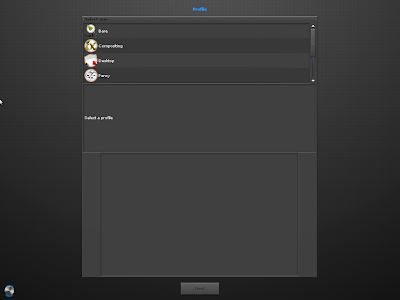
The default desktop has a Mac crossed with KDE feel. However, I could use the settings to change profile to look like Gnome 2 or a typical Snowlinux with only the lower panel. Further, there is a mobile option for touch devices with a touch key pad. I started the mobile option but unfortunately couldn't find a way to go back to the other profiles. Ultimately, reinstalled the OS again as a solution!

From Snowlinux 3 e17 Crystal
Applications
Just like it's gnome counterpart, even here, the applications are carefully chosen considering the systems on which E17 is supposed to run. Most of them are lightweight and less taxing on the system, like, Abiword for Office. There is no point of having a relatively heavier LibreOffice suite and hence, the developers' decision to put Abiword is correct. However, I would have liked to see Gnumeric as well.
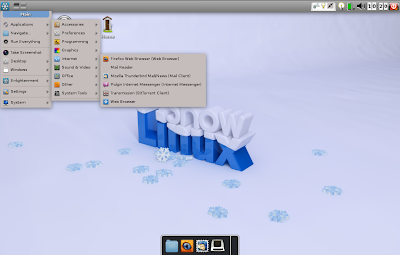
Firefox 14 is the primary browser. There is no by default flash support. Lightweight browsers like Dillo or Midori could have been given as an option but anyway, Firefox is miles ahead of all of them. Firefox 15 is already out and users can upgrade to 15. Thunderbird is the default email client with a bit torrent client completing the list. There is a menu entry for a "Web Browser" which I thought would be some lightweight browser provided in addition to Firefox, but it opens Firefox only. Possibly it is a lapse or meant to start the default browser, assuming users will install multiple browsers! Further, for some apps there are no icons! It doesn't look good and possibly the developers should take care to refine this distro further.

From Snowlinux 3 e17 Crystal
Audacious is the default music player and Gnome Media Player is for media. Multimedia codecs are there by default and hence, users can play movie or songs right after installation is complete. Few other applications are there like Geany for programming, leafpad, etc. Overall, it is not many but some essential softwares provided out-of-the-box. For rest of the apps like VLC, Chrome, Skype, Cheese, etc. and multimedia codecs or Flash plugin, there is Debain repository to download from!

From Snowlinux 3 e17 Crystal

One good thing is that all the settings are integrated to a common window, Settings Panel. I find this integration helpful as it reduces a lot of headache for new users.

From Snowlinux 3 e17 Crystal
The OS has two file managers, Thunar 1.2.3 and Enlightenment. I expected Thunar 1.4.0 here as it's been 4 months since it got released.

From Snowlinux 3 e17 Crystal
Anyway, both are fast and provide almost all necessary functionalities like drag and drop, cut-paste-copy, etc. And I tried moving a file from Thunar to Enlightenment by drag and drop and it worked! However, Thunar is definitely a more functional file manager, originally designed for XFCE.

From Snowlinux 3 e17 Crystal

Installation
Installation didn't take much time for me, maximum 15 minutes, with the internet switched off. I just had to choose language, keyboard language and location at which I intend to install it. Boot up was quick, within 10 seconds and I didn't face any trouble over any driver not working or internet not working. So, it was practically trouble free for me.  Post installation, Update manager notified me of a 10 MB update and things were up and running after that.

From Snowlinux 3 e17 Crystal
Repository
Snowlinux is 100% compatible to Debian repository and everyone knows how rich it is! Applications cna be downloaded via both Software Center and Synaptic Package Manager. I downloaded quite a few essential apps like VLC, Cheese, GIMP 2.8, adobe flash plugin, etc.. All of them worked without any issue, what-so-ever.

From Snowlinux 3 e17 Crystal
RAM and CPU Usage
Here, I was a bit disappointed initially. On the same machine, Snowlinux 3 with Gnome 2 consumed 125 MB RAM and 5-10% CPU. I expected E17 edition to consume significantly lower memory but it was around 130 MB with 2-5% CPU usage. But, when I tested RAM/CPU usage with Firefox, Abiword, Media player running, it was around 170 MB with 2-6% CPU usage. So, definitely this distro can run well even on systems with 256 MB RAM! And that is really encouraging.

From Snowlinux 3 e17 Crystal

Overall
Did I mention how incredibly fast and responsive this distro is? Yes, it is fast, real fast. Plus, my touchpad worked out-of-the-box with it. Given the kind of multi-tasking opportunity even on low resource systems. So, for those who are running a PIII or a PIV, instead of installing minimalistic distros, you can try out Snowlinux 3 e17! If it works for you, nothing like it! Barring few rough edges, it is a really secured distro with plenty of functional packages to offer and can put antiquated systems back to life and running. To add to it, Snowlinux 3 E17 is supported until February 2016 and is fully compatible to Debian repo. Further, for modern systems, if you need a Linux which is extremely fast, works with modern drivers and very functional offering a complete range of applications, you should try it out. I bet you won't be disappointed.
Read more!

Friday, September 7, 2012

Knoppix 7.0.4 Review: Lightweight Linux on the go!

The tale of Linux as live CD or USB started all with Knoppix. First time Knoppix showed that you can have an OS which you need not install and can carry conveniently to anywhere you go! Other Linux distros soon followed the suit and possibly, Knoppix lost it's advantage somewhere down the line.

From Knoppix 7.0.4
I have heard a lot of Knoppix but never used it before last week. On the release note of Knoppix 7.0.4 came in Distrowatch, I was quick to download the 730 MB ISO. Definitely, the ISO size is significantly higher than similar distros like Puppy Linux or Slitaz but comparable to crunchbang, another lightweight minimalistic distro. Knoppix is a Debian based distro and has Linux kernel 3.4.9. So, it will be based on Debian testing, I guess.

The live boot up was really fast and I was greeted with a typical LXDE desktop. I used a 512 MB RAM Asus P4 old laptop to test Knoppix. Neither of the modern Ubuntu clans distros load on it. Lubuntu 12.04 loads but barely runs! I have Crunchbang installed there as my main OS.

To my surprise, Knoppix performed really fast on it and I could multi-task with Iceweasel (though I hate this Firefox derivative!), Synaptic package manager downloading updates, LibreOffice writer, and LibreOffice calc running! I saw the RAM consumption - 150 MB! CPU consumption of 1-6%! Even by low resource consuming Linux distros, I haven't such a thing!

From Knoppix 7.0.4
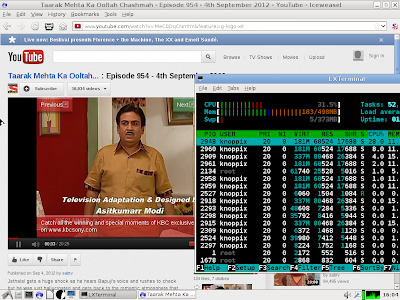
With only task manager running and nothing else, the default desktop loads with about 70 MB RAM. Of course, if you start playing flash videos, the story might not be as good! To test how Knoppix performs with flash video running, I installed flashplugin from Debian repository, using synaptic package manager. Post installation I tried out youtube videos and with a flash video playing, the RAM consumption was 180 MB! Now, that is pretty impressive!

From Knoppix 7.0.4
Like Puppy, Knoppix loads totally on RAM and even in low resource systems, performs really well. Plus, through Knoppix, users can download variety of applications from Debian repositories. Now, that is an advantage Knoppix has got over Puppy or Slitaz! Once loaded, it recognized my lan connection perfectly with input of IP configuration from my side. Wifi was also recognized properly, I faced no problems with sound or display.

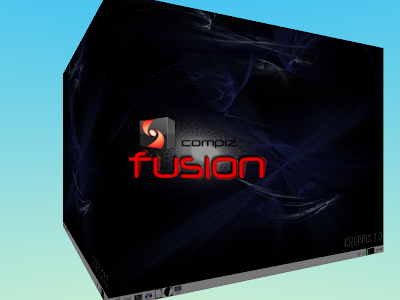
Application-wise, it is quite rich with full LibreOffice suite, Iceweasel browser (you can download Firefox as well), Pidgin messenger, GIMP 2.8, Gnome MPlayer, among other things. File manager is PCManFM 1.0, the latest version. There is compiz given as well, and if your system supports, you can add some cool desktop effects. I played a bit with Re(-start) 3D desktop compiz to create the cube. But, I guess there's some compatibility issue of compiz with advanced Linux kernels and many times the screen simply went black while rotating the cube to finally come back after 5-10 seconds. Also, may be my low powered system is responsible for it not working properly!
From Knoppix 7.0.4

From Knoppix 7.0.4
Java is provided by default. Adobe flash plugin, as mentioned earlier, need to be downloaded. Further, you can download your favorite programs from Debian stable, testing and experimental repositories. Possibly that is one of the best Linux repo you can get!
From Knoppix 7.0.4
Now in live-boot one thing I noted is Knoppix never asked for any root password, not even for downloading programs. So, I decided to install it in my HD and check how good it performs when installed. Installation didn't take much time. I had to format and partition my HD and rest went really smooth. Finally, it installed GRUB and I was ready to go within 5 min.!
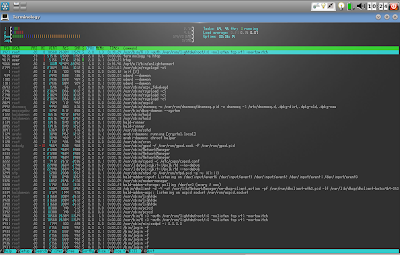
Post installation, it took 5 sec. flat to bootup and load the desktop. It was the same as live boot but I see 20% less RAM consumption once I installed it in HD. LXDE desktop with Htop or task manager running takes 65 MB, and Iceweasel with flash video in youtube running takes 160 MB! Of course, CPU usage is around 30-40%, mine is an old processor. But, even after installation, it didn't ask for an user ID creation or root password! However, there is an option in the menu Knoppix -> Set password for root, where I changed the root password. Still it never never asked me the changed password even for installing apps after a re-boot. Like Puppy, this may be a security concern.
From Knoppix 7.0.4

From Knoppix 7.0.4
In overall, I must say I am impressed with Knoppix. It is lighter than, say a Lubuntu and the installation process is easy. I tried with USB drives and I guess auto-mount is there and had no issues with it. It is definitely a distro worth recommending to anyone who is looking for a lightweight but complete Linux OS. It can run on a 128 MB RAM computer but 256 MB is recommended to enjoy flash videos and multi-task.

Read more!

Wednesday, August 15, 2012

Crunchbang 11 20120806 Review: Minimalistic but highly functional

If you need a cutting edge Linux OS but you have a very very low resource computer, what would you do? You download Crunchbang and your computer will start performing blazing fast and amazingly stable. Now Crunchbang 11 Waldorf is in the testing stage, based on Debian Wheezy (it's also testing till date). I guess once Wheezy is released as a stable distribution, we will have the Crunchbang stable as well.

The 800 MB ISO I downloaded from Crunchbang site, is a testing version and hence, may not be ideal to use for your regular production work. However, I bet once you use it, you'll end up using it regularly. In my use, I didn't note any significant bug or anything not working. Of course, it is in virtualbox.

From Crunchbang 11 20120806
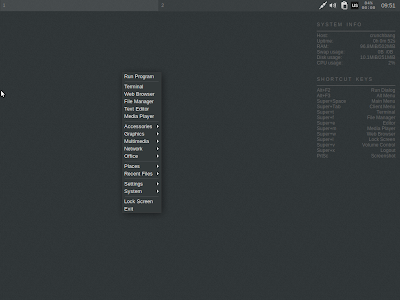
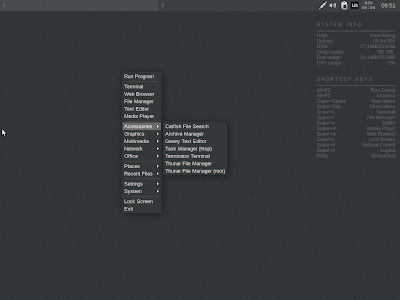
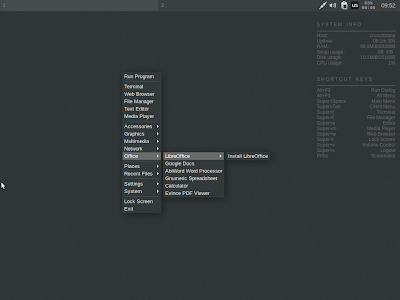
Live boot is quick and fast. It will ask you whether you want a live boot or install it. The desktop is pure minimalistic - no menu no icons - nothing. Right click and you get everything! There is a conky on the right upper corner to tell you the system stats and short cuts.

From Crunchbang 11 20120806
Applications
Crunchbang is in a different genre of minimalistic distros. It is minimalistic but complete and the 800 MB ISO is packed with almost all the essential apps, except may be VLC. Abiword, Gnumeric and Google docs are there for Office work, along with a link to download LibreOffice suite. Iceweasel is the default browser (which I never liked) with out-of-the box flash support along with links to download your favorite browser like Chromium, Firefox, etc. GIMP is to manage your image editing needs and it is the latest version (2.8). Multimedia section is weak with only Gnome media player but you can download VLC, Rhythmbox, Banshee, etc. from the debian repository.
From Crunchbang 11 20120806
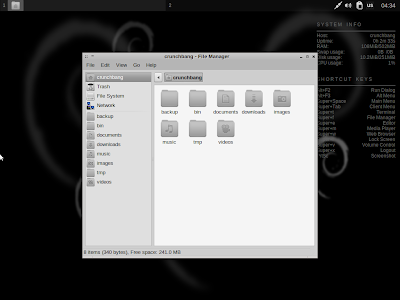
The distro is all black and white. Even Google is kind of black colored in Crunchbang! If you love black, you'll surely have fun with Crunchbang.

From Crunchbang 11 20120806
Minimalistic is stylish as well - look what happened when I changed the wallpaper!

From Crunchbang 11 20120806
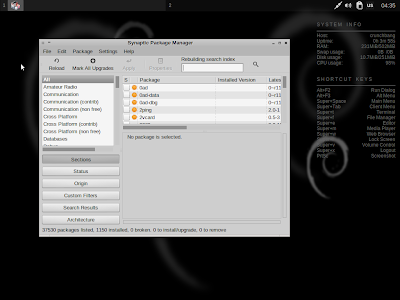
The Synaptic package manager can be used to add/delete applications and it sources apps from the Debian testing repository.
From Crunchbang 11 20120806
CPU and RAM Usage
Crunchbang uses the nimble Openbox window manager and is extremely light on resources. With only conky running, it uses about 100 MB RAM and 4-5% of CPU!


Overall
I am eagerly waiting for the final release. Crunchbang 11 would definitely be lighter than any other debian derivative and extremely functional, as well. I am really fond of the minimalistic look that Crunchbang has along with the stability of Debian. Specially those who think Gnome 3 and Unity are ruining the essence of a lightweight, low resource consuming but functional Linux OS, Crunchbang is a must try for them. If you like it, you'll get addicted to it.

More screenshots of Crunchbang 11 is in my Picasa album.


Read more!