Showing posts with label openbox linux. Show all posts

Monday, February 4, 2013

Sparkylinux 2.1 “Ultra” Review: Lightweight, fast and elegant Openbox distro for low spec computers!


From performance point of view, these days, Openbox is my favorite desktop environment. I found it actually to be more efficient and less resource consuming than either LXDE or XFCE and works very efficiently on low powered P4 machines. Perhaps the most famous distros with Openbox DE are Archbang and Crunchbang. Recently, SparkyLinux came up with their version of Openbox spin. In this article, I review SparkyLinux 2.1 "Ultra" Openbox as well as do a brief comparison with Archbang and Crunchbang.

This assessment is done entirely by me. My assessment is based on installation on Asus K54C laptop with 2.2 Ghz Core i3 processor and 2 GB RAM and experience of using it for the last 3 days. I downloaded the 32-bit ISO (1.4 GB in size) for this testing. Sparkylinux 2.1 “Ultra” has an Openbox DE with Linux kernel 3.2.0. PCManFM 0.9.10 is the default file browser. 

Read more!

Wednesday, August 15, 2012

Crunchbang 11 20120806 Review: Minimalistic but highly functional

If you need a cutting edge Linux OS but you have a very very low resource computer, what would you do? You download Crunchbang and your computer will start performing blazing fast and amazingly stable. Now Crunchbang 11 Waldorf is in the testing stage, based on Debian Wheezy (it's also testing till date). I guess once Wheezy is released as a stable distribution, we will have the Crunchbang stable as well.

The 800 MB ISO I downloaded from Crunchbang site, is a testing version and hence, may not be ideal to use for your regular production work. However, I bet once you use it, you'll end up using it regularly. In my use, I didn't note any significant bug or anything not working. Of course, it is in virtualbox.

From Crunchbang 11 20120806
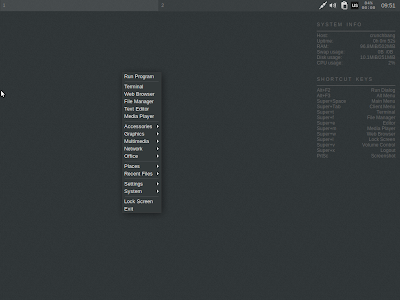
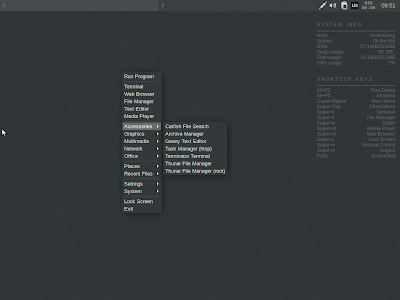
Live boot is quick and fast. It will ask you whether you want a live boot or install it. The desktop is pure minimalistic - no menu no icons - nothing. Right click and you get everything! There is a conky on the right upper corner to tell you the system stats and short cuts.

From Crunchbang 11 20120806
Applications
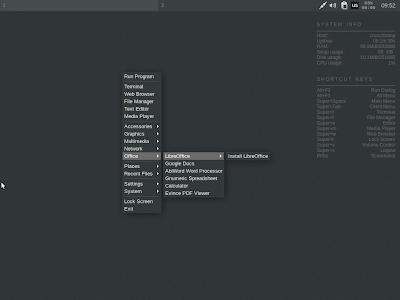
Crunchbang is in a different genre of minimalistic distros. It is minimalistic but complete and the 800 MB ISO is packed with almost all the essential apps, except may be VLC. Abiword, Gnumeric and Google docs are there for Office work, along with a link to download LibreOffice suite. Iceweasel is the default browser (which I never liked) with out-of-the box flash support along with links to download your favorite browser like Chromium, Firefox, etc. GIMP is to manage your image editing needs and it is the latest version (2.8). Multimedia section is weak with only Gnome media player but you can download VLC, Rhythmbox, Banshee, etc. from the debian repository.
From Crunchbang 11 20120806
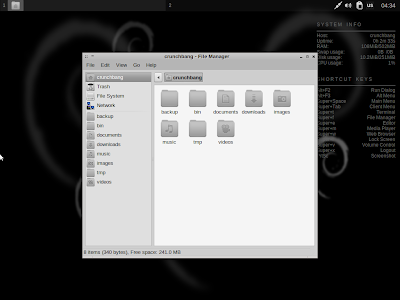
The distro is all black and white. Even Google is kind of black colored in Crunchbang! If you love black, you'll surely have fun with Crunchbang.

From Crunchbang 11 20120806
Minimalistic is stylish as well - look what happened when I changed the wallpaper!

From Crunchbang 11 20120806
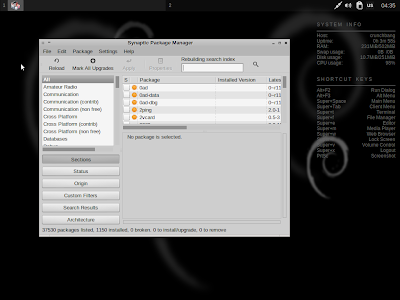
The Synaptic package manager can be used to add/delete applications and it sources apps from the Debian testing repository.
From Crunchbang 11 20120806
CPU and RAM Usage
Crunchbang uses the nimble Openbox window manager and is extremely light on resources. With only conky running, it uses about 100 MB RAM and 4-5% of CPU!


Overall
I am eagerly waiting for the final release. Crunchbang 11 would definitely be lighter than any other debian derivative and extremely functional, as well. I am really fond of the minimalistic look that Crunchbang has along with the stability of Debian. Specially those who think Gnome 3 and Unity are ruining the essence of a lightweight, low resource consuming but functional Linux OS, Crunchbang is a must try for them. If you like it, you'll get addicted to it.

More screenshots of Crunchbang 11 is in my Picasa album.


Read more!

Sunday, June 17, 2012

Light Linux Series: CrunchBang - Minimalistic but robust


CrunchBang is derived from Debian with an openbox desktop. Minimalistic in design but highly functional.

I downloaded crunchbang-10-20120207-i386.iso (662 MB) from CrunchBang Download. Like all Linux distros these day, it offers 32-bit and 64-bit versions. My desktop suited 32-bit. Download file size is bigger than other light-weight linux distros I reviewed earlier.

I booted the OS from a 4 GB USB file. The booting time was not as quick as Puppy or Slitaz but it was quick. I was greeted with a black interface with a Conky telling details of my computer. CPU usage was around 3-10% & RAM 100-150 MiB.

The interface offers a few choice of wallpapers - all on black theme!


One of the biggest advantage of CrunchBang is rolling release. That means install once and enjoy it forever. It is minimalistic in design and a lot of Ubuntu / Mint users, who are familiar to a colorful interface with a lot of special effects, may not favor it's dull look.

But, to be honest the distro is very functional. Taking screenshot was difficult as Prt Scr button didn't work. Right clicking anywhere on the desktop opens up the menu. Had to scroll down to take screenshot. Default editor is GIMP (which is good). GIMP can any day replace Adobe Photoshop, equally powerful and people familiar with Photoshop would be at ease with GIMP.


VLC player is provided by default, another good news. If you're using Linux, VLC is a must to play all formats of videos.


Default internet browser is Chrome and it has flash-plugin installed. Good that you can directly view youtube without updating the distro. That doesn't happen with even Ubuntu or Debian. All expected features like remote desktop connection, bittorrent client, IRC chat and FTP client are there. Dropbox is an added feature in CrunchBang - Android users need no intro of Dropbox.


Abiword, Gnumeric and PDF viewer are provided by default. You can download complete LibreOffice suite from the menu link provided.


All in all, I liked CrunchBang. Though it is not as light as Puppy or Slitaz (in terms of size) but provides a complete OS to users with outdated computers. Though it is not designed keeping old computers in mind, but it works even in P3 with 256 mb RAM (as reported in http://crunchbanglinux.org/forums/topic/703/minimum-requirements/. Also, you get to leverage Debian & Ubuntu repositories and install apps from there.

The community support is good and you can leverage Ubuntu & Debian support as well. All in all, a functional distro to have if you really don't care of looks but care about speed. It has good amazing speed for sure. So, if Ubuntu 12.04 LTS is bugging your system down, CrunchBang is there to help your computing needs!

Read more!