Bodhi Linux always has a special place in my Linux OS repertoire for being one of the most lightweight Ubuntu derivatives with Enlightenment 17 as the desktop manager. Another fantastic aspect about Bodhi is "semi-rolling release". In nutshell, it means that though the distro is based on Ubuntu LTS but all major packages are backported to their latest versions available. For example, users of Ubuntu 12.04.1 LTS are still stuck with Linux kernel 3.2 and antiquated softwares like GIMP 2.6 and LibreOffice 3.5. But, Bodhi users will have their Linux kernels updated to 3.7.0, LibreOffice to 3.6 and will be using the highly acclaimed GIMP 2.8. In fact 3.7 kernel is not even there in Ubuntu 12.10! So, you can imagine the advantages of using Bodhi Linux! This is one of the many reason why I like Bodhi Linux and I call it the "Bleeding Edge Ubuntu".
Previously I had positive feedback of the 2.0.0 version and once the Distrowatch release note came out of the 2.2.0 version, I was eager to try it out and test the enhancements made.
In short, the new Bodhi 2.2.0 has now two different versions - one for old machines, the 32-bit non-pae version with Linux kernel 3.2.0 and the other, for more advanced machines - 32-bit pae and 64-bit versions with the latest Linux kernel 3.7.0. The 32-bit pae version can run well on a 64-bit machine too. I downloaded the 32-bit pae ISO, 567 MB in size.
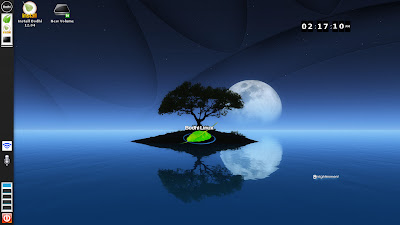
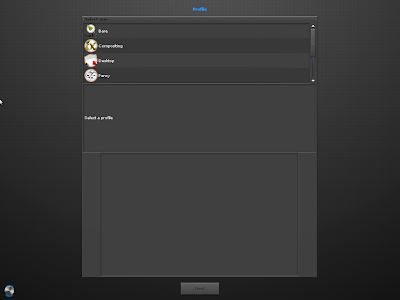
First, I did a live-boot and went for installation on my Asus K54C laptop, 2.2 Ghz Core i3 processor, with 2 GB RAM. In live-boot, I selected the Composite option and chose the Moonlight theme. To my surprise I was greeted with a very attractive looking desktop, with a kind of Ubuntu-ish left hand side strip! Bodhi Linux never looked so shiny and good!
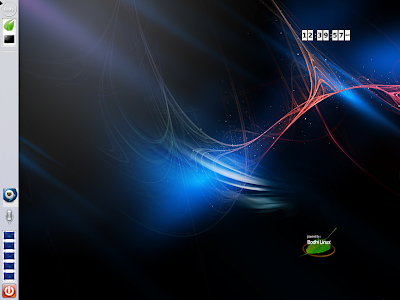
I checked the other themes as well, and all of them looked quite catchy. This is definitely a great development from Bodhi - Enlightenment never looked so compelling in any other OS, I am sure!
On hardware detection, Bodhi 2.2.0 worked as expected - Wifi detected with ease, sound card worked perfect, touchpad worked good. EFM (Enlightenment File Manager) is the default option for browsing files and it is fast to use. The distro felt really smooth to use and lightweight with a very attractive GUI.
Applications
At 567 MB sized ISO and being a past user of Bodhi, I knew what to expect in applications section. It is a shell which Bodhi provides with very minimal applications like Midori browser, Leafpad, LXterminal and a screenshot. Of course, there are quite a few themes provided for E17 desktop alongside.
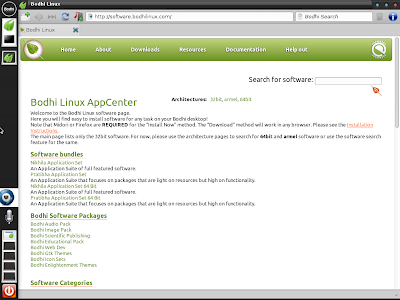
The best part I like about this release, is the offline guide provided on how to set up Bodhi and install applications. It is very handy for any new user. I could browse and install the Nikhila package from Bodhi AppCenter. Almost all daily use packages, plus flashplugin and multimedia codecs are given there and are very easy to install.
Settings manager is a bit different in E17 and it takes a bit of time to get familiar with all the options. However, one familiar, I found it actually quite easy to use and change the look and feel.
Installation
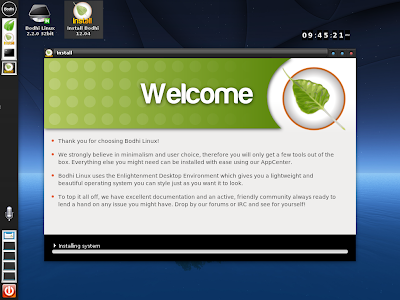
Installation is just like Ubuntu and doesn't take more than 30 minutes. The steps are given below as pictures and I could install the OS in my first attempt.
Repository
As mentioned, Bodhi has it's own application sets (Bodhi AppCenter) plus it sources from Ubuntu repository. Applications can also be installed through synaptic package manager, given by default in the ISO.
AppCenter too has bundles like Nikhila and Pratibha for the user which packs the commonly used apps to be downloaded together. Nikhila is for full featured software and Pratibha comprises of lightweight apps. Both direct installation and download option, to install later, are available. Further, Bodhi has audio, video, publishing, education, graphics, etc. packages bundled separately. I really like the bundled application option provided, as it makes life easier for a new user.
Performance
Bodhi, as expected, consumes very little RAM to run. I didn't see any system monitor or task manager with the installed ISO. Hence, I downloaded the Gnome System Monitor by typing sudo apt-get install gnome-system-monitor in the terminal.
System monitor showed RAM usage of about 80 MB to load the desktop with system monitor running, of course! However, I noted a bit high CPU usage (about 8-20%). Normally CPU usage of installed Linux distros range between 1-10%. Further, to cross check, I booted Bodhi 2.2.0 on a netbook (Asus 1101HA EeePC, 1.33 Ghz Intel Atom with 1 GB RAM). It showed there too a bit high CPU usage, abnormal for a lightweight OS. Later, I confirmed that it is due to compositing. Selecting a different desktop theme, like desktop or fancy, brings it down to normal level. So, no worries there!
Presentation and Offline Mode
Before I forget, there is another notable add-on - presentation mode. I normally like to watch movie or read books on my laptop and screensavers act as continuous irritation till I disable them. Now, Bodhi has a good way out. If the screensaver appears and is immediately turned off, Bodhi provides an option to go to the presentation mode! Highly functional and appreciated! You can also select presentation mode via Menu -> Settings -> Modes -> Presentation Mode.
Another good option is Offline Mode. It stops modules that pool network resources and is handy to increase download speed if you are downloading something. Again a handy option to have and is well appreciated.
Overall
Without any doubt, Bodhi 2.2.0 is a remarkable improvement over Bodhi 2.1.0. Enlightenment 17 never looked so enticing on any other Linux OS and Bodhi never looked so attractive. Bodhi is buttery smooth to use, runs super fast, provide all essential functionalities and has a rich repository. Further, presentation and offline mode are two utilities which increase the functionality of the distro.
Moreover, Bodhi is always ahead of even Ubuntu 12.10 in terms of providing the latest of the Linux packages and softwares. Even this release is not an exception and provides the latest Linux kernel and softwares to the users without compromising on stability, and possibly, one of the reasons for me to like Bodhi Linux and why any Linux enthusiast should try Bodhi out. It is truly bleeding edge Ubuntu LTS!
I definitely rate this release of Bodhi as the best one I have seen for any E17 Linux OS. If you are looking for a lightweight distro, look no further than Bodhi Linux 2.2.0, possibly one of the best releases of 2013.
You can download Bodhi Linux 2.2.0 from here.
20th Jan 2013: One small addition, I have been using Bodhi 2.2.0 for last few days on one of my netbooks with 1.33 Ghz Intel Atom processor and 1 GB RAM. It is fast, slick and offers some very good looking desktop interfaces. However, the E17 file manager is a real pain and doesn't offer full range of functionalities. So, I downloaded Thunar from Ubuntu repo and made it the default file manager. Other than that, I didn't have any issue with Bodhi. It is buttery smooth to use and incredibly fast!
Read more!