Showing posts with label Sabayon. Show all posts

Wednesday, May 15, 2013

Sabayon 13.04 KDE review: One of the most elegant distros in the Linux world

Let me begin this way, I am a great admirer of Sabayon for quite sometime. This Italian distro is based on Gentoo Linux and provides an enviable ensemble of pre-installed applications which just works out of the box. Those who are scared of Gentoo, Sabayon can be a good starting point. Apart from being based on one of the most popular Linux operating systems, one of the greatest USPs of Sabayon is it's aesthetics. It comes with a very professional dark blue theme with application interfaces tweaked to match it. I haven't seen many Linux distros doing it, to be honest.

From Sabayon 13.04 KDE http://mylinuxexplore.blogspot.in
Sabayon, in every release, gives a ready to use Gentoo Linux based operating system with pre-installed applications and multimedia codecs. It has a rolling release cycle with around 3 releases every year. For example, in 2012, Sabayon 8, 9 and 10 were released in Feb, Jun & Sep 2012 respectively. The Apr'13 release is named differently as 13.04 rather than Sabayon 12 (Sabayon 11 was released in Feb'13). Anyway, apart from the change in nomenclature, rest of the things haven't changed much in Sabayon 13.04. In Fabio Erculiani's words
"Sabayon 13.04 is a modern and easy-to-use Linux distribution based on Gentoo, following an extreme yet reliable rolling-release model. This is a monthly release generated, tested and published by our build servers containing the latest and greatest collection of software available in the Entropy repositories. Linux kernel 3.8.8 with BFQ iosched and ZFS, GNOME 3.6.3, KDE 4.10.2, MATE 1.6, Xfce 4.10, LibreOffice 4.0, production-ready UEFI support and experimental systemd support are just some of the things you will find inside the box"
I tried out the KDE flavor of Sabayon 13.04 and will take you through my experience in this review. I downloaded the 32-bit ISO, about 2.3 GB in size and installed it in my Asus K54C with Core i3 2.2 Ghz processor and 2 GB RAM. Imagewriter (available in Linux Mint) works well with Sabayon to create a bootable USB.

Read more!

Saturday, December 8, 2012

Bridge Linux 2012.12 Review: Arch Linux a bit simplified

I haven't tried out Arch Linux yet but I plan to do so next year. Mostly my experience is concentrated on Ubuntu, Fedora and their derivatives. Now with every passing release all these distributions are getting heavier and resource consuming. Puppy is a definite saving grace, no doubt. But, as an user I want to create my own lightweight all purpose operating system using Arch. Further, the rolling release of Arch is a definite advantage, once you set your system, you don't need to re-install every alternate year.
KDE Bridge Linux 2012.12
Bridge Linux is kind of an intermediate step between Arch and Ubuntu. It provides all the resource friendliness that Arch is characterized by and in addition provides an out of the box system with most of the things like soundcard, touchpad, graphic display, a desktop environment, etc. configured to save your time and energy. 


LXDE Bridge Linux 2012.12
XFCE Bridge Linux 2012.12
Bridge Linux has a release every four months and for December 2012, it had to offer four flavors - Gnome 3.6, KDE 4.9.3, XFCE 4.10 and LXDE. I downloaded 32 bit versions of all four but could run only three - the Gnome 3.6 won't boot to a GUI and failed every time I tried. For the rest three, I live-boot all of them on my Asus K54C with 2.4 Ghz Core i3 processor and 2 GB RAM. I installed only the XFCE version on my system to try it out.

Live-Boot
Why I kept this separate section unlike my other reviews? Because a live-boot of Arch Linux runs into all kinds of trouble, if you use Unetbootin. I tried quite a few but none of them would work. So, I started my Windows 7 OS after quite a few months and installed Universal USB installer but that too failed! Finally after a brief search, I got reference of Linux Live installer for Windows OS and it worked! Though the interface is not simple and it may start downloading virtualbox, but I found it works for Arch. Bridge was not one of the specified distros in its list, however, given it works for Arch Linux, it worked for Bridge Linux as well. I created live boot of all the four ISOs that I downloaded.

Comparison

Parameters Bridge KDE Bridge XFCE Bridge LXDE
ISO size 1 GB 696 MB 547 MB
Linux kernel Linux 3.6.7-1-ARCH
Desktop KDE 4.9.3 XFCE 4.10 LXDE
File Manager Dolphin 2.1 Thunar 1.4.0 PCManFM 1.1.0
CPU Usage 2-10% 2-5% 1-3%
RAM Usage 330 MB 130 MB 80 MB
Installation 30 min 30 min 30 min
Programs – Internet Chromium, Kopete, Bittorrent client, Kmail, Internet Dial up tool Chromium, Thunderbird 17, Transmission Chromium, Transmission
Programs – Multimedia Amarok, Dragon Player, Kmix AudioMixer, DeaDBeef, Xfburn Exaile, Gnome Mplayer, Xfburn
Programs – Office Complete LibreOffice 3.6 suite, Okular Abiword, Gnumeric, Dictionary
Programs – Graphics GIMP 2.8, Gwenview, Ksnapshot GIMP 2.8, Shotwell Imageviewer
Programs – Others Qtdesigner, Archiving tool, Nepomuk backup, Kate, Kwrite Archive manager, bulk rename, calculator, Leafpad, Screenshot Archive manager, calculator, Leafpad
Wifi detection Immediate Immediate Immediate

LXDE version is the lightest but thin on application as well. KDE version is the most complete with KDE centric applications and Chromium browser. In fact, all Bridge Linux versions have Chromium as the main browser.

All three of them boot pretty quickly and are very smooth to use. Given there is no package manager (pacman) on live-boot, user experience is pretty limited. Even flashplugin is not by default, neither multimedia codecs - so, the best option with bridge is to install and then try it out.


From Bridge Linux 2012.12
One thing about the KDE distro that surprised me, is there are no Restart or Shut down buttons. It has only options for logging out or locking the screen! A bit amusing, how am I supposed to shut the system down?

Luckily XFCE and LXDE editions had the conventional options of restart and/or shut down. XFCE is my preferred desktop these days and hence, to further check the OS, I installed XFCE version on an 8-GB partition.

Installation
Installation is simple, though not as simple as a Ubuntu or Linux Mint. It will ask for Language, Location, disc to partition (create two partitions - one for boot and another for swap, else things may not work as you desired), target for installation, installation of grub and finally configuring root and user. It took me about 30 min. to complete the installation without any major/minor hiccups.

Post-installation
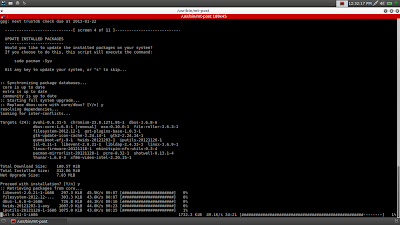
After installation, I ran the post installation script and it downloaded pacman, plus updated the OS. However, I didn't find any pacman GUI and so, resorted to terminal to download my favorite applications. Arch forums and documents really helped me for the same. You can download all the desired applications, Adobe flashplugin, etc. using Pacman via terminal. I tried downloading the pacman GUI but none of the packages given here could be downloaded.


From Bridge Linux 2012.12
However, for experienced Linux users, terminal is not an issue. I downloaded VLC, codecs, Adobe flashpluginInkscape, Teamspeak, Skype 4.1, Quastrocam, etc. from the repos. All of them worked with my hardware. Linux kernel, desktop environments and applications are all latest and up to date, no complains there.


From Bridge Linux 2012.12
CPU and RAM Usage
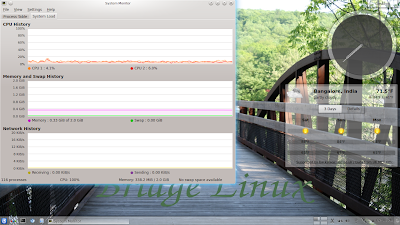
The table in the comparison section already highlights that LXDE is the lightest and KDE the heaviest of the versions. Presumably, Arch Linux is supposed to be among the lightest Linux around. If I take the KDE 4.9 version and compare to the 32-bit operating systems that I used in 2012, definitely XFCE and LXDE versions score above the rest in terms of low RAM and CPU usage.

RAM Usage (32-bit) KDE 4.9 XFCE 4.10 LXDE
Bridge Linux 330 MB 130 MB 80 MB
Ubuntu 12.10 300 MB 160 MB 134 MB
Linux Mint 13 300 MB 160 MB -
Manjaro 0.8.2 440 MB 160 MB -
OpenSUSE 12.2 340 MB - -
Sabayon 10 270 MB - -
Linux Lite 1.0.0 - 140 MB -
ROSA 2012 - - 122 MB
Zorin Lite 6.1 - - 130 MB
Peppermint 3 - - 135 MB


CPU Usage (32-bit) KDE 4.9 XFCE 4.10 LXDE
Bridge Linux 2-10% 2-5% 1-3%
Ubuntu 2-10% 1-5% 1-5%
Linux Mint 2-10% 1-5% -
Manjaro 0.8.2 5-7% 0-8% -
OpenSUSE 12.2 1-5% - -
Sabayon 10 5-10% - -
Linux Lite 1.0.0 - 1-5% -
ROSA 2012 - - 1-10%
Zorin Lite 6.1 - - 5-8%
Peppermint 3 - - 1-5%

LXDE is surprisingly low (80 MB), most of LXDE distros I used consumed about 120-130 MB to load desktop with task manager running. KDE too is at par with other operating systems, if not lower.

From Bridge Linux 2012.12

Overall
I definitely recommend the XFCE and LXDE versions. Both of them are resource friendly and customizable. I really liked the KDE version, KDE 4.9 looks damn smashing but where the hell restart/shut down buttons go? Else, it is recommended. Gnome 3.6 version didn't work for me and hence, not recommended from my side. From both out-of-the-box applications and resource friendliness point of view, XFCE version seems to the most balanced and best of the lot.

The heading of the article says a bit simplified because even Bridge doesn't simplify Arch enough for a newbie and it takes a bit of Linux knowledge to get going on bridge. Manjaro is better for a newbie. However, for an experienced user, I would safely recommend Bridge over Manjaro for being a lighter distro. Manjaro seems to be a bit heavy for an Arch distro!

All in all, I am quite contented with both XFCE and LXDE versions and will use XFCE installation as the main distro in one of the machines I have. It is damn good!

You can download Bridge Linux from here.

Read more!