Showing posts with label Gentoo. Show all posts

Wednesday, May 15, 2013

Sabayon 13.04 KDE review: One of the most elegant distros in the Linux world

Let me begin this way, I am a great admirer of Sabayon for quite sometime. This Italian distro is based on Gentoo Linux and provides an enviable ensemble of pre-installed applications which just works out of the box. Those who are scared of Gentoo, Sabayon can be a good starting point. Apart from being based on one of the most popular Linux operating systems, one of the greatest USPs of Sabayon is it's aesthetics. It comes with a very professional dark blue theme with application interfaces tweaked to match it. I haven't seen many Linux distros doing it, to be honest.

From Sabayon 13.04 KDE http://mylinuxexplore.blogspot.in
Sabayon, in every release, gives a ready to use Gentoo Linux based operating system with pre-installed applications and multimedia codecs. It has a rolling release cycle with around 3 releases every year. For example, in 2012, Sabayon 8, 9 and 10 were released in Feb, Jun & Sep 2012 respectively. The Apr'13 release is named differently as 13.04 rather than Sabayon 12 (Sabayon 11 was released in Feb'13). Anyway, apart from the change in nomenclature, rest of the things haven't changed much in Sabayon 13.04. In Fabio Erculiani's words
"Sabayon 13.04 is a modern and easy-to-use Linux distribution based on Gentoo, following an extreme yet reliable rolling-release model. This is a monthly release generated, tested and published by our build servers containing the latest and greatest collection of software available in the Entropy repositories. Linux kernel 3.8.8 with BFQ iosched and ZFS, GNOME 3.6.3, KDE 4.10.2, MATE 1.6, Xfce 4.10, LibreOffice 4.0, production-ready UEFI support and experimental systemd support are just some of the things you will find inside the box"
I tried out the KDE flavor of Sabayon 13.04 and will take you through my experience in this review. I downloaded the 32-bit ISO, about 2.3 GB in size and installed it in my Asus K54C with Core i3 2.2 Ghz processor and 2 GB RAM. Imagewriter (available in Linux Mint) works well with Sabayon to create a bootable USB.

Read more!

Sunday, February 24, 2013

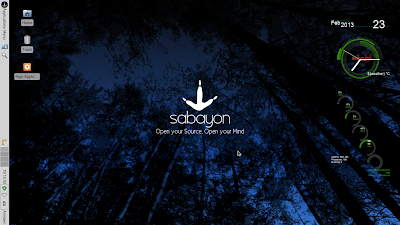
Sabayon 11 XFCE Review: Extremely refined and a release not to be missed!

The name "Sabayon" always rings me of a very refined and extremely polished Linux operating system. As has been my experience with Sabayon 9 and 10, even the Sabayon 11 release doesn't disappoint. Sabayon 11 is refinement exemplified and is released in four flavors: Gnome 3, KDE, XFCE and LXDE. I start this series of review with my preferred desktop environment, XFCE.

From Sabayon 11 XFCE http://mylinuxexplore.blogspot.in
Sabayon 11 has XFCE 4.10 with Linux kernel 3.7.0. Sabayon is based on Gentoo linux and is a simplified version of Gentoo, I must say. I tested with the 32-bit ISO, about 1.3 GB in size, and supports live-boot. Sabayon has a rolling release with three of it's releases (8, 9 and 10) coming in 2012. Those who are already using Sabayon need not to worry about the 11th release - already their installations would be upgraded to 11.

Read more!

Sunday, August 5, 2012

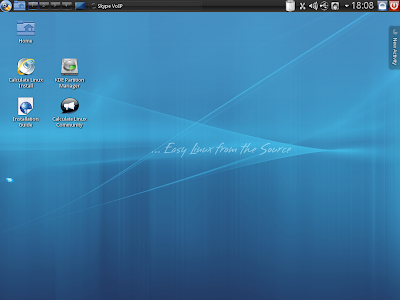
Review of Calculate Linux 12: KDE with a twist!

I wanted to try out some Linux distros which are not Fedora or Ubuntu based. So, in came Calculate Linux 12 Desktop version and I liked what they have done with KDE here. The KDE ISO is big (2.3 GB) and I downloaded it from the calculate linux site. Just a day before Calculate Linux, I tried out Scientific Linux - given similarity in names and a large ISO size, my expectations were really high!

The boot up was quick and unlike Scientific, Calculate didn't require installation. The KDE interface is pleasant and I really liked the Gnome flavor the developers have rendered here.

From Calculate Linux 12

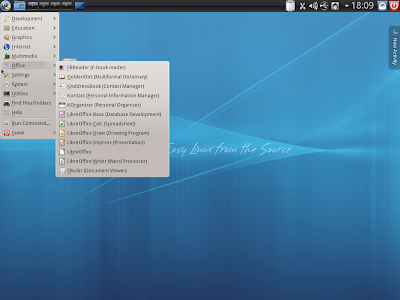
From Calculate Linux 12
Applications
Very rich indeed! Except VLC, I could locate all the applications I need. Even Flash support is out-of-the-box! Amarok (did I tell it is my favorite music player!) & Gnome Media player in Multimedia section, LibreOffice suite & Okular in Office, GIMP 2.8 in Graphics and Chromium & Skype in Internet! I don't know of many Linux distros who provide pre-configured Skype! This is as complete as it gets. In addition, I really liked the Virtual Globe - my 1 year old daughter enjoyed it a lot!


From Calculate Linux 12

From Calculate Linux 12
I really like GIMP 2.8 and it is definitely an improvement (at least in the interface to GIMP 2.6. Calculate is definitely cutting edge!
From Calculate Linux 12

Calculate console is quite simple and easy to operate even for the newbies. 
From Calculate Linux 12

From Calculate Linux 12
CPU & RAM Usage
RAM usage was on the higher side 440 MB, with only System monitor running. CPU usage is around 5-10%. Pretty decent for a KDE desktop.

From Calculate Linux 12
Overall
I definitely recommend Calculate for those who neither like Ubuntu, nor Fedora. It is a pretty stable distro rich in applications and you can download more via the software manager.

A host of screenshots are in my Picasa album. Please visit.

Read more!