To start with, I became a big fan of PCLinuxOS since February this year. First time, I used PCLinux (I am still a Linux n00b) when I downloaded the
Feb'12 release and installed it in one of the systems I have. I am not a KDE fan but PCLinuxOS is different! I have used Ubuntu mostly in last 2 year or so and I could never successfully update Ubuntu - I had to do fresh install every time! PCLinuxOS is actually the first Linux OS which I could upgrade without breaking anything. Also, there's a knowledgeable and helpful forum in place to help you out of issues like screen not displaying proper resolution and stuff like that!
The netbook where I have PCLinuxOS is already upgraded to the latest version and is working good. However, to test what's new in this release, I downloaded the ISO separately - just to try it out. The present ISO is a little bit on the heavier side, nearly double of the last release, 1.3 GB! I did a liveboot on my Asus EeePC 1101HA with 1.3 GHz dual core Intel Atom processor and 1 GB DDR3 RAM. Not really great specs but PCLinuxOS 2012.02, now upgraded to 2012.08, runs smoothly on the machine.
The appearance hasn't changed significantly from the last edition with minor facelifts here and there. Overall, there's no drastic change to shock the users. Linux kernel is updated to 3.2.18.2bfs and KDE is 4.8.3. I guess you can install KDE 4.8.5 or 4.9 (final version to be released) in PCLinuxOS as well. NVIDIA and ATI support is out-of-the-box and it works well with common graphic cards.
Applications
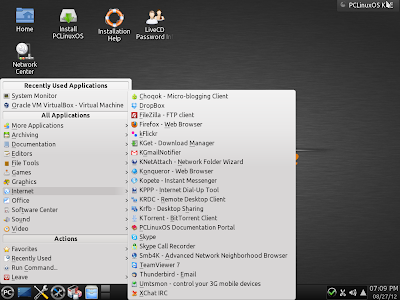
A major change in this version to provide the users more complete out-of-the-box experience and that also explains the increase in ISO size! You name an app and it is here in PCLinuxOS 2012.08. Unlike the Feb'12 release, where you had to download LibreOffice suite, this time LibreOffice is out-of-the-box. Internet section is possibly the richest I've seen in any Linux OS with Firefox 14, Konqueror, Dropbox, FileZilla FTP client, K-get download manager, desktop sharing, bit-torrent, Thunderbird 14, Xchat, and Skype by default in the ISO along with other regular KDE apps. I think it is more than enough for a regular user. Flash support is by default and Youtube, Hulu, Dailymotion, etc. flash videos works well in Firefox. I did live streaming of some Indian TV channels and everything worked fine without any hiccups.
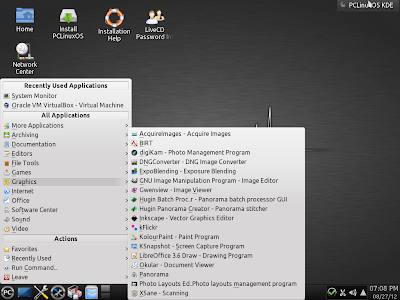
Multimedia section is very good with VLC, Television viewer, Webcam app Kamerka, DVD slideshow maker, Clementine music player, Audio format converter, etc. I would have loved to see Amarok but Clementine too is really good. Graphics has GIMP 2.8, Gwenview, Flick photo sharing app, Photo management programs, apps to manage raw images from DSLR cams and convert them into jpg or png files, etc. As a topping, the developers have provided virtualbox as well! Virtualbox provided in the installation ISO is 4.1.18 which is not the latest one but once you use it, it will prompt to download the latest rpm package 4.1.20.
With so many ready to use apps, it is an envious ensemble and I doubt I would require any more app to download from the repository.
Repository
PCLinuxOS has a pretty good repository and you can download via synaptic package manager. Some of the packages like Skype (repo has 2.2), Firefox (now that distros are coming with FF15), etc. in the repository are not updated or not there (like Chrome). For these, the rpm files are widely available in internet. I download two of my favorite applications, Pidgin and Gwibber and installed them from the repository. Also, I downloaded Chrome rpm packages from Google Chrome website and installed it without any hassle, whatsoever.
CPU and RAM Usage
CPU usage is about 5-10% and 300 MB RAM with only system monitor running. Even in my 1 GB RAM netbook, where I upgraded PCLinuxOS 2012.02 to 2012.08, often I do a lot of multi-tasking with Firefox, LibreOffice calc and LibreOffice Writer open without any slowing down. Hence, I won't say PCLinuxOS is a resource hungry distro.
Overall
I definitely recommend PCLinuxOS 2012.08 for it is arguably the best KDE distro available right now. Linux Mint KDE would be the other KDE distro I would think of as a competition. Both are easy to the eyes in terms of looks, works really well with commonly available computers and are easy on the resources. However, one advantage PCLinuxOS has, is its rolling release. You need to install the OS only once and won't have to take the added burden of re-installing it again. It will update itself to the latest with every available release. But, it doesn't work that well in Ubuntu or Mint - there is an upgrade option but it never worked with me in last 4 attempts - every single time something got broken and I had to do a fresh installation with the added burden of saving all the files and favorites in an external HDD and downloading my favorite apps again. I haven't tried PCLinuxOS on 64 bit machine yet. Developers say that the same installation ISO works for both 32 and 64 bit machines but I need to check whether it is able to read beyond 4 GB RAM. Otherwise, two thumbs up for this amazingly refined distro with perhaps the richest collection of apps keeping every user in mind. It doesn't matter whether you are new to Linux or a Linux veteran, once you start using PCLinuxOS, I bet you'll like it! Windows XP and 7 users would be at home in PCLinuxOS as KDE is the closest to Windows than Gnome or XFCE. And it is getting better with every release!