Showing posts with label Ubuntu 12.04.1 LTS. Show all posts

Sunday, February 10, 2013

Linux Lite 1.0.4: With added Steam!

When I reviewed Linux Lite 1.0.0 last year, I was pretty happy with the lightweight XFCE distro. The release was based on Ubuntu 12.04 LTS and was quite lighter than Xubuntu 12.04. Once the 1.0.4 update for Linux Lite came out in February 2013, I was a bit curious to try out and see the incremental additions that the developers have made to the updated release.

I found a few changes from 1.0.0 in 1.0.4, namely:
1. Linux kernel is updated to 3.2.18 and it seemed to be more stable than the previous release.
2. A new gaming application added with variety of games for Windows and some games for Linux - Steam.
3. A few applications like LibreOffice Impress added to the application list.
4. The ISO is now lighter by about 160 MB which is a welcome change.

From Linux Lite 1.0.4 http://mylinuxexplore.blogspot.in
Other than that, it is pretty much the same as the past release. I'll cover my experience with Steam in the later part of the article. I expected a little bit more especially on desktop environment and application aspect, namely:

Read more!

Saturday, December 15, 2012

Comfusion 4.1 Review: Lightweight, attractive and feature packed Ubuntu 12.04.1 LTS spin

I heard of Comfusion as the Spanish version of Ubuntu earlier but have never used it before last week. Essentially it combines Ubuntu core with LXDE, Openbox & Mate desktops and some cool 3D effects using compiz. The latest version is Compiz 4.1, based on Ubuntu 12.04.1 LTS with Linux kernel 3.2.0.

From Comfusion 4.1

The 32-bit ISO DVD I downloaded is about 882 MB, which, I would say, is a moderate sized ISO considering most of the Ubuntu spins these days shell out ISOs exceeding 1 GB in size. Post download, I had to unzip the ISO to make it work. It's release note came on 8th December 2012.

Post downloading the ISO, I didn't go for a live-boot test this time but straight away installed it on the 8 GB partition I have for Linux testing on my Asus K54C 2.4 Ghz Core i3 with 2 GB RAM laptop. Comfusion offers three desktop GUI options, Openbox only, Openbox with LXDE and Mate 1.4.2. Openbox and LXDE have PCManFM 0.9.10 as file manager and Mate option has Caja 1.4.0. PCManFM is lightweight and blazing fast whereas Caja offers more functionalities.

From Comfusion 4.1
From Comfusion 4.1 with Mate 1.4.2


From Comfusion 4.1with minimalistic Openbox desktop
Installation
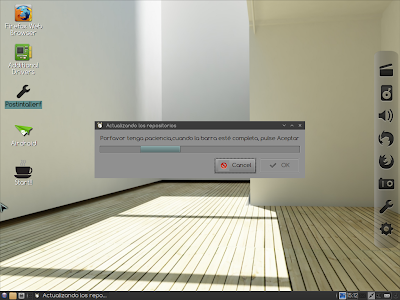
Installation is pretty similar to Ubuntu 12.04.1 and as simple as it can be. It just took me half an hour to install it with the latest updates and third party softwares like Adobe flash plugin, multimedia codecs, etc. Comfusion was up and running once I rebooted and without any hiccups. There is a post installer script to update the repositories and download additional updates without hitting the terminal. Unfortunately it is written in Spanish whereas the entire distro, incl. package manager GUI are in English, in the ISO I booted up. 

From Comfusion 4.1

Applications
Comfusion offers an interesting choice of applications. More or less the applications provided by default cover most of the basic needs, except office. A default list is provided below:
  • Internet: Firefox 17 with Adobe flashplugin 11, Pidgin, TeamViewer 7 running on Wine, Thunderbird 17 and Tor secure browser (essentially Firefox 10 ESR)
  • Graphics: Image Viewer, Simple Scan
  • Office: Dictionary, Document viewer, Gnumeric spreadsheets
  • Multimedia: Audacious for music, Gnome MPlayer to play videos, guvcview webcam, Record my desktop, TV on Linux
  • Accessories: Archive manager, Compiz & Emerald on off icons, leafpad, screenshot, terminal emulator, calculator, etc.
From Comfusion 4.1
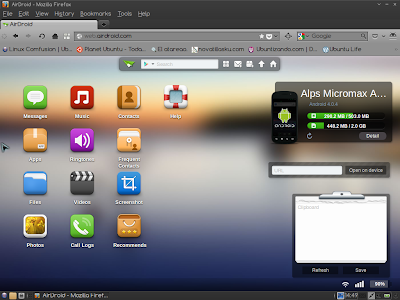
There are a couple of other entries in the internet menu, namely Airdoid and Bump, which I hesitate to call as applications. Essentially these are links which open on Firefox or any other default browser. Functionality offered by these applicatons is really good if you own an Android device or iPhone. In case of Airdroid, I successfully browsed and edited the contents of my Android phone from my computer by just plugging both the devices to the same Wifi network. Same with bump, if you want to save the pictures taken by your smartphone to your computer without having to plug in. Good options indeed but it can be done on any OS with a browser and capable of connecting to a Wifi network.

From Comfusion 4.1
From Comfusion 4.1
From Comfusion 4.1

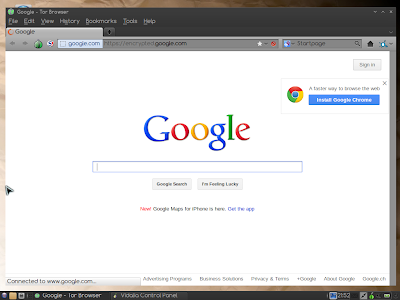
Tor browser bundle is the secure browsing option but it is tad bit slow for my taste. Otherwise, it can help in anonymous browsing, if you prefer to do so. Even the default Google page is encrypted on the Tor browser.


From Comfusion 4.1
One of the glaring misses I noted is a missing document editor. Another is PlayonLinux and some gaming softwares.The release note talks of Angry bots but I didn't any such game in the ISO itself. I imagine people who would like to see cool effects on their desktop would be interested in playing some cool games as well. Otherwise, Comfusion offers a decent set of basic applications.

Repository
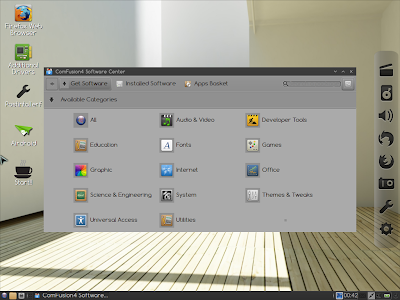
Comfusion4 Software Center is the Lubuntu Software Center GUI, modified and is compatible to the rich Ubuntu Precise repository. Further, synaptic package manager is also provided for users preferring synaptic. And it has some good news for users like me who prefer terminal to download applications. Comfusion offers a "apt-fast install" option for quicker download of applications. I tested it to download quite a few apps and it is at least 20% faster. And it is not available in Ubuntu or Linux Mint, I checked it! Essentially apt-fast, instead of apt-get, splits the package file into smaller pieces and then downloads them, thereby saving a lot of time.

From Comfusion 4.1
From Comfusion 4.1

3D Effects and Attractiveness of the distro
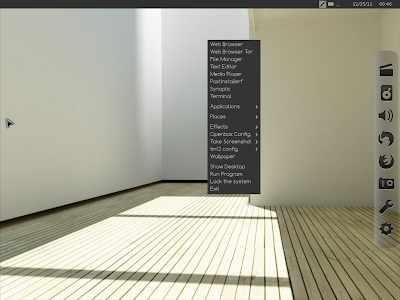
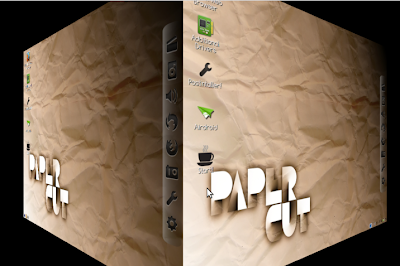
The main USP of Comfusion, over other Ubuntu derivatives, is the oomph factor it renders to Ubuntu. I know Ultimate OS also does the same but it is too ugly to look at. Whereas Comfusion looks clean, bright and professional. Plus, you can switch on and off the effects very easily. Accessories -> Compiz & Emerald, switches on the special effects with a transparent lower panel, transparent terminal, wobbly windows and you can make desktop cubes rotate with Ctrl+Alt+Right or Left key. Again, Accessories -> Compiz & Emerald switch off stops it. Very easy even for Linux newbies.

From Comfusion 4.1

These 3D effects work on all the three desktop options provided. The default desktop is LXDE and it looks best of the lot. Openbox is as usual minimalistic and would certainly save some RAM & CPU for you over LXDE/Mate. Mate 1.4 on the other hand, looks, exactly like Gnome 2 and it gels well with compiz effects.

Emerald themer too didn't work good for me and I could make use of it well. TV on Linux was also not of much interest to me, there are quite a few better live stream options available online.


From Comfusion 4.1
Wbar with shaded icons actually looks good on the desktop but a docky is a more preferred option for me. Wbar has limitation in the number of apps you can put, plus if you are to add there any new app that you downloaded, you would need a suitable icon image for it. Difficult considering if you put a different icon from the blackish theme, it will look real funny and ugly. Docky or cairo dock doesn't have such limitations and has a lot of themes available to choose from.

These apart, a lot of theme and look n feel customization options are available in compiz, I experimented with quite a few, some worked but others didn't. Still, I don't mind as already what is in plate is quite awesome.

CPU and RAM Usage
Another USP of Comfusion, apart from the special effects, is very low RAM and CPU usage. Openbox and LXDE took about 110 MB RAM to load desktop with 1-5% CPU usage. Both LXDE with openbox / Openbox are actually lighter than Lubuntu 12.10 or ROSA 2012 LXDE. Mate 1.4 desktop took slightly higher at 180 MB RAM and about 1-10% CPU. Still quite decent, I would reckon. However, CPU and RAM usage are considerably higher once the desktop effects are switched on. Preferably I would keep them off to save resources, unless I want to impress someone with "the power of Linux"!

Overall
Comfusion offers an unique proposition among the Ubuntu derivatives with a clean and elegant interface and lots of special effects. Added incentive is it's really low resource consumption, much lower than Ubuntu 12.04.1 LTS with Unity. Stability wise, without effects there are no issues and things run smoothly. But, with effects on, at times, the system just froze and I had to hard reset. Look and feel is very refined with boot up and login screens really looking good. Further, Comfusion provides users a lot of options to manipulate settings and desktop as per individual taste. Apt-fast is a real good addon on Compiz and I wish it was there in every Ubuntu derivate!

Bottomline, Comfusion is lightweight and packs a punch above its weight. The developers have done a great job in packing three desktop options in a less than 900 MB ISO. Comfusion looks cool, is great to use and feature packed. Definitely recommended and worth giving a shot.

You can download the ISO from here.

Read more!

Thursday, December 6, 2012

UberStudent 2.0.4 Review: Exceptional not only for students or researchers but for regular use as well!

The world of Linux never ceases to amaze me. Every functional area has a distro available, a distro for medics, for forensic, for hackers, for different languages, for different regions and the list is endless. Most of these are typically Ubuntu, Debian or Fedora derivatives with softwares loaded to fulfill one or more specific mandate(s). UberStudent is one such distro, an Ubuntu derivative, designed for students and academicians/researchers. Being a PhD myself (before I seriously started using Linux and made on Windows XP), my natural inclination was to try it out and get a feel of it.
From Uberstudent Aristotle
UberStudent 2.0.4 (Distrowatch release note) ISO is really on the heavier side (3.7 GB) and offers two desktop environments: XFCE 4.10, the default desktop, and Mate 1.2. Built on Ubuntu 12.04.1 LTS base with Linux 3.5 kernel, the image I downloaded offers both the desktops. A lighter version with XFCE or Mate is also available. Right now it supports only 64-bit machines with minimum 1 GB RAM - I would recommond to use a 64-bit machine with 2 GB RAM for optimum results.

From Uberstudent Aristotle
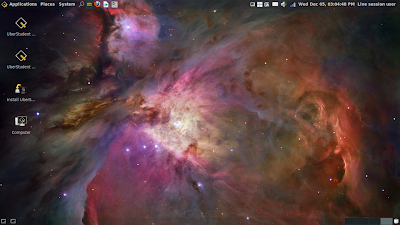
I created a live-USB out of it with Unetbootin and the process is similar to Ubuntu. Live boot has a login screen with "uberstudent" as username and password blank. I dislike having to enter a username/password for live boot but anyway! I booted it up on my favorite Asus K54C 2.4 Ghz core i3 with 2 GB RAM laptop and after that installed it on a 15 GB partition to test the distro (it is big and doesn't support 8 GB partition for installation).

Applications
UberStudent applications, though revolve around education and research, include the fun part of student life as well! The lost count of how many applications it has - may be 100, it may be 200 as well! Plenty of applications or download link of almost every major regular application are provided out of the box in the distro along with its core educational/research applications. I won't bore you providing the laundry list but mention some notable applications which are useful from research and regular user point of view.
  • Internet: Firefox 17, Chrome, Skype 4 download link, Pidgin, uGet download manager, FileZilla client, Lightread, Podcast client, RSSOwl to read RSS feeds, etc.
  • Graphics: GIMP 2.8, Inkscape, Pinta, Pixlr, Gtkam digital cam browser, Photo printer, gthumb and a lot of other applications. It has almost every graphics app you can think of!
  • Multimedia: VLC, Audacious along with a host of others (either the applicaton itself or download link provided like Recordmydesktop, Audacity, Openshot, Google Play music player (unfortunately not launched in India yet!), Hulu, last.fm, grooveshark, pandora, etc.
  • A complete LibreOffice 3.6 suite by default with word processor, spreadsheet, base, draw, impress, etc. and PDF writer and reader along with a link to download Adobe PDF reader
  • Download links for Virtualbox, teamviewer, etc.
  • Couple of file managers: Caja 1.4 and Thunar 1.4, both lightweight and offer good functionality
  • Wine is provided but I didn't found PlayonLinux - anyway, I can do that small favor as most of the softwares I like are already there in the DVD!
  • A host of cards and board games to keep you entertained during breaks!
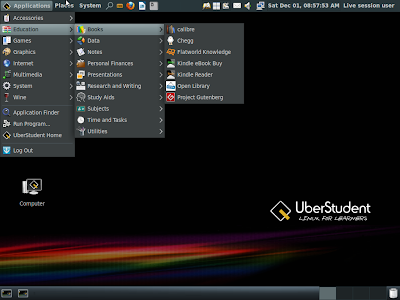
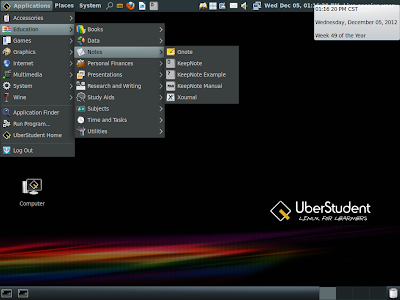
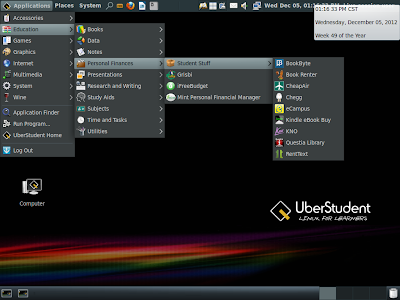
And wait! I haven't started discussing the main application list yet - the educational ones! I noted all the relevant applications I could think of already existing in the ISO. The screenshots below will take you through the long list.

From Uberstudent Aristotle

I was glad to see LyX document processor (a Latex alternative) - writing dissertation/articles on MS Word is simply painful and even LibreOffice doesn't help! A link to Google Public Data is another handy tool, plus Open Library, Calibre, Stop watch, a host of presentation softwares along with Impress, etc. are really handy for sure. Zotero worked well for me post installation of Adobe reader. Shortcut keys work well just like Ubuntu and Guake terminal works with F1 key here instead of the usual F12 keys. Further a handy list of Firefox, Chrome, LibreOffice, LyX shortcuts are provided which is of great help and makes life easier.

An installation of R would have made me happier but I can live with what I am getting here! A bit greedy, eh?

Repository
Ubuntu software center is notably absent here but there's a synaptic package manager to install applications from Ubuntu 12.04 repository. Agreed, synaptic is cumbersome for novice Linux users but the developers more than compensate by providing direct installation links for most of the desired applications like Skype, Scilab, wxMaxima, Virtualbox, TeamViewer, multimedia codecs, etc. which is helpful.

Installation
Installation is like normal Ubuntu 12.04.1 and it is easy taking about 20-25 minutes. Check my article on Ubuntu 12.04 for installation.

CPU and RAM Usage
A bulky distro, it is and it consumes a bit higher RAM than Ubuntu, even with XFCE / Mate. I noted about 600 MB of RAM usage at steady state - my 64 bit Linux Mint 13 Cinnamon installation consumes about 400 MB. I don't mind a 200 MB extra RAM usage for the benefits I am getting installing UberStudent. CPU usage is normal, 2-5%.

Overall
Undoubtedly brilliant and functional derivative of Ubuntu - I can imagine a lot of effort and thought going in creating this operating system. But, why is it so ugly? I really hated the interface when I booted it up. First thing I did was to give it a face-lift. Later I installed a conky and it started looking appealing to me. As I understand, a college/university student would prefer having a attention grabbing desktop - why not provide it by default?

From Uberstudent Aristotle
Otherwise, UberStudent offer an exceptional proposition and is much more stable than Ubuntu 12.04.1. Out of the box, it offers a wide range of software and uses lighter desktop managers. User experience is really good - nothing crashed in my 10 days of usage. Touchpad, Wifi, sound, etc. worked right from the word go and to say the least, I am really impressed. Definitely recommended for the researchers looking out for an education/research oriented operating system and you can download it from here.

Read more!