Gentoo Linux is one Linux OS I haven't tried yet. But, surely this week I am going to try their 2009 Special DVD edition. The best feature of Gentoo is, it is version-less and once you make an emerge update, it has the most up-to-date packages. There are step-by-step guides available to install Gentoo and once I try it, I'll know how complicated or easy it is!
Sabayon is a Gentoo based Linux distro, created with the philosophy of "out-of-the-box" philosophy and it aims to give users a wide range of applications, ready to use and a self-configured operating system. I reviewed the
Sabayon 9 as well and was pretty impressed by it!
I
downloaded the Sabayon 10 Gnome, KDE and Mate versions. XFCE is also there but I wanted to try out the Mate version, which is new in Sabayon 10 release. ISO sizes are quite heavy, 1.6 GB for Gnome and 2.1 GB for KDE. Mate is 763 MB and is a stripped down version with very few apps. I downloaded 32-bit versions of all the distros.
I booted all of them in my Asus K54C laptop with 2.2 GHz
Intel 2nd Gen Ci3 processor and 2 GB DDR3 RAM. Given limited RAM, I guess, 32-bit ISO won't be an issue.
First was a live-boot followed by HD installation. Live-boot was graphical and quick without asking any unnecessary Q&A. Installation using the Anaconda installer was really easy and similar for both Gnome and KDE. It asked me questions on language, keyboard, location and HD drive where to install. I set up the user account and passwords for root and user account. And within 5 minutes this is done. Rest of the installation took about 25 minutes and within 30 min. my laptop is ready with Sabayon installation.
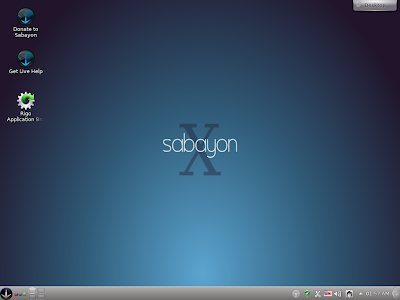
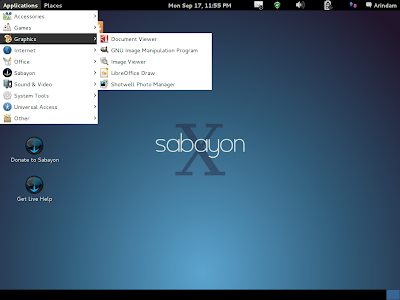
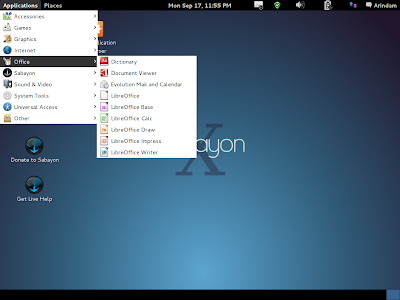
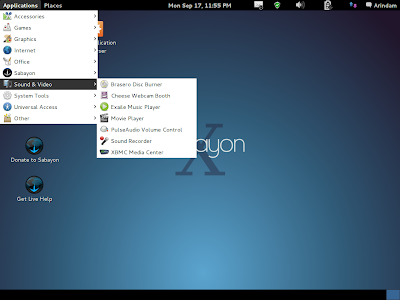
Gnome 3 desktop is similar to what is there in Fedora or OpenSUSE. The dark blue interface looks really well and of course, you can change the wallpaper to make it look less serious. In KDE, you can install themes and it'll look brighter as well. Due to some driver issue, my first boot was in Gnome fallback mode, which I later corrected. Hence, the pictures below show those taken with Gnome fallback.
Applications
Both Sabayon KDE and Gnome have a rich ensemble of the latest applications. Linux kernel is the latest 3.5, Gnome 3.4.2 and KDE 4.9.
Gnome 3 desktop is very simplistic and resembles a Gnome fallback. From Applications at the left top, you can browse the application list. Main applications are GIMP 2.8 for image editing, Shotwell for image management and uploading to facebook/flickr/twitter, Chromium is the main browser with empathy as chat client, bit-torrent client to download, LibreOffice suite for office work, document viewer to read comics archives and PDF files, Basero, Cheese Webcam booth, Exaile music player, and Gnome media player. Though VLC is not there in the Gnome version, but all Gstreamer and ffmpeg codecs are there and I could play a movie straight away, out-of-the-box!
The KDE version has more apps, mostly KDE centric, apart from what are there in the Gnome version. VLC player is a welcome addition in KDE, and I wished it was there in the Gnome version as well. Nothing plays media better than VLC! Also, desktop globe is by default, in KDE. I really like the 3D view and my 2 year old daughter enjoys playing with it! Good app, for sure.
So, you can understand, most of the applications that a normal user often requires, are all there in the default installation. Adobe flash, too, is pre-installed and I could play youtube videos and live stream channels smoothly. Also, the distro detected my LAN connection well with minor IP configuration inputs. Wifi was also automatically detected when I tested with a Wifi. I didn't face any trouble with sound as well.
All the settings and configurations are in the one stop shop of settings manager, just like other good Linux distros. It really helps new users to configure the system if all the controls are at the same place.
Repository
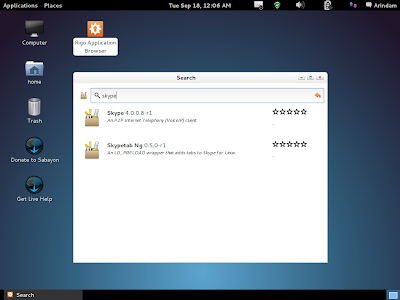
Rigo application browser (whose link you can find on the desktop) is the graphical front-end of the repository. With going in details on entropy and portage package managers, I found the repository to be very good and with the most updated applications. Normally, I find Skype 2.0 in most of the Linux repositories and need ot download the packages for Skype 4.0 from the site. However, Sabayon has Skype 4 in the repo itself. I downloaded Skype and VLC from the repository and both worked well.
One caution, though the Magneto Updates notifier will tell you everything is updated post installation, you need to refresh packages in Rigo before you can see and download other applications. I found Rigo to be very good and easy interface to search and install applications.
CPU and RAM Usage
With only task manager running, both Gnome and KDE gave me very low resource requirements. Gnome used 5-10% of CPU and 225 MB of RAM, where KDE used same CPU and 270 MB of RAM. Even with Chromium on, I could see only 300 MB RAM usage. System never crashed or no error messages popped up during my usage for last 3 days.
Overall
Sabayon made me more interested to try out the Gentoo DVD. I found Sabayon 10 to be really good and user friendly. Everything has a graphical interface and new users won't get lost whether to write 'su' or 'sudo' on the command line! Further, documentation on the distro is quite rich and you can access them through the Sabayon menu. Resource requirement is low which makes it usable on low specs computer/laptops. Applications are really the latest ones and it makes sense to install Sabayon on a top end model as well, as you won't need to reinstall it ever again. Thus, there is no need for a fancy LTS nomenclature as well!
Things work out-of-the-box unless you are really unlucky! Interface looks really serious and smart. I didn't note any instability during my use. I have been a PCLinuxOS fan for long but seems like Sabayon may be my preferred OS after this review.