My interest on Arch Linux is increasing with every passing Arch based distro review. Last week I used Bridge Linux and was fascinated by it. This week I spent considerable time in learning as well as using Archbang, another Arch Linux based operating system with Openbox window manager. It gave me performance comparable to Puppy Linux and I replaced my Lubuntu 12.10 installation with Archbang on my HP Pentium 4, 2.4 Ghz, 1.5 GB DDR RAM desktop. To say the least I am more than fascinated by its speed, versatility and ease of use.
Archbang has a rolling release like Arch Linux and I guess, updated release comes every quarter. I saw 4 updated releases in 2011 but only a couple of releases in 2012 with the latest release on 8th December. I saw a disclaimer attached: "for the competent Linux user". That was kind of a challenge and I accepted it having used around 50 operating systems in last three years.
The 32-bit ISO is a lighter one, about 572 MB. For live-boot again, Unetbootin won't work and I used the Windows installation of Linux Live. Even though Linux Live USB creator wasn't able to detect the OS but never the less, it created an USB which successfully booted up. I used my HP desktop (as mentioned above) for testing Archbang to assess how it would perform on a low resource system. My yardsticks were Puppy Precise and Lubuntu 12.10, which were currently installed in it.
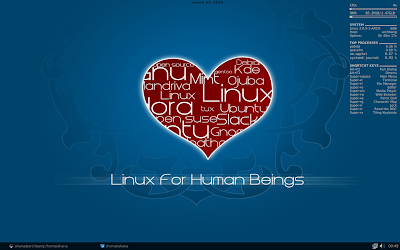
Archbang uses the lightweight Openbox window manager. It gives kind of a minimalistic and naked look. I somehow wasn't very fond of the grim black look but opted for a colorful one as shown in the first picture. Also, I didn' t like the dark tone menu and file manager and changed them to a more conventional gnome style. But, the distro is bleeding edge with the latest softwares. December 2012 release has Linux kernel 3.6.9. To give you an assessment, Ubuntu 12.10 is still at Linux 3.5, even Bridge Linux is at 3.6.7! So, truly you get the latest before any other distro offers it. It has both pros and cons, as I'll explain later.
Application
Going by the size of the ISO, I didn't expect a whole lot of applications in there. However, the applications given were carefully chosen ones to meet users basic needs. A list of the default applications provided is given below:
The desktop is minimalistic and there is a conky which decorates the desktop. Pretty basic applications provided and there is front-end GUI to download applications. Further, there is no conventional menu to access the applications - a right click anywhere opens the menu. The file manager is really good and offers almost all the flexibility that I required. SpaceFM can be improved though by giving a preview option.
Installation
Having installed Bridge Linux earlier, I felt at home while installing Archbang. Pretty similar installation process asking for location, language, preference of disk, partitioning, creation of user name and changing root password and finally, installing grub. It takes about 30 minutes to install, like any other Linux distro.
Post installation installation of applications
Now post installation, there is no post install script like Bridge Linux here. Bridge is much more simplified than Archbang. Again Arch Wiki came to my help and I could download a host of applications like VLC 2, Skype 4, Chrome, Pidgin, Abiword, Gnumeric, etc.
First of all, I had to update the repository sources and hence, I resorted to terminal as root, using the following commands:
$su
$<type root password>
#pacman -Syy
#pacman -Syu
First pacman command is equivalent to apt-get update in Ubuntu and next one, -Syu is equivalent to apt-get upgrade.
Then I started downloading one application after another using command:
#pacman -S vlc
#pacman -S clementine
#pacman -S openjdk6
#pacman -S abiword
#pacman -S gnumeric
for VLC player, Clementine player, Java, Abiword and Gnumeric. Similarly I downloaded a host of other apps like Skype, Midori, pidgin, etc. To avoid writing so many lines you can also type the following command (doesn't require the su and enter password part!)
$sudo pacman -S vlc clementine openjdk6 abiword gnumeric
Arch Linux repository is very rich and you can find most of the regular applications. The lightweight operating system I wanted to create is done. Now I wanted to decorate it a bit as the default Archbang desktop looks too bland for my taste. I downloaded a few colorful wallpapers and changed the conky position and color (Preferences -> Conky Config -> Edit .conkyrc).
Further, I noted post installation that I forgot to include a 50 GB NTFS hard drive while installing, as one of the default boots. I tried a lot to manually mount the drive but it won't work. USB and External hard drive auto-mount worked as udev was there. So, I created a folder named sda1 in my home directory and in terminal typed the following command as root (with su and then typing the password)
#mount -t ntfs-3g /dev/sda1 ./sda1
The entire hard drive was mounted on the folder. It helped me avoid re-installing the operating system.
Another pain was the timeout after every 5-10 min of inactivity, especially while watching movies or videos. There is no settings GUI option in Archbang and I didn't require to download as I could easily control the timeout from terminal by
$xset s 3600 3600
which would extend the time before the screen would go blank to 1 hour. You can even extend it beyond that as well.
It was fun playing with the distro for a day and set everything up including webcam. Sound detection was automatic initially but after a couple of days it broke when I updated the system. The AlsaMixer v1.0.26 downloaded somehow caused it. Playing with it for 15-20 minutes resolved the issue and now it is working fine. I had no usse with mouse, keyboard or LAN/Wifi.
CPU and RAM Usage
This is the best part of Archbang. Openbox takes only 75 MB of RAM and 1% CPU to load. Further, with Firefox playing youtube video and VLC, Abiword, Gnumeric running, the RAM usage was only 250 MB and CPU usage of 60%. Even if the CPU usage is 100% the system never hangs! I am seriously impressed! Lubuntu uses about 130-150 MB RAM on the same system and gets painfully slow when you start using more than one application as the single core CPU is unable to support it. Puppy performs really good on it and no issues with Puppy. But, it is not cutting edge and I wanted something latest. So, I installed Archbang and removed Lubuntu from it. Now Archbang is my main distro instead of Puppy Precise.
Overall
I won't recommend Archbang to a total newbie, Bridge Linux is a much simpler option where complexity is relatively less and distro is more stable. But, for advanced Linux users, Archbang can be fun. However, given Archbang is bleeding edge, there can be minor issues here and there with every major update. Be prepared for it if you are to use one of the most impressive lightweight and complete distro available around. It is snappier than Puppy Linux and much more agile than any of the Ubuntu or Fedora based system I have used. For now I am sticking to it as the main operating system on my desktop with Puppy Precise as backup. Archbang may be a bit tough to begin with but Arch wiki and Archbang community are really helpful to back you up. In nutshell, a fantastic operating system to use if you have studied Linux for sometime and willing to use a highly functional but no frills operating system.
 |
| From ArchBang 2012.12.03 |
The 32-bit ISO is a lighter one, about 572 MB. For live-boot again, Unetbootin won't work and I used the Windows installation of Linux Live. Even though Linux Live USB creator wasn't able to detect the OS but never the less, it created an USB which successfully booted up. I used my HP desktop (as mentioned above) for testing Archbang to assess how it would perform on a low resource system. My yardsticks were Puppy Precise and Lubuntu 12.10, which were currently installed in it.
 |
| From ArchBang 2012.12.03 |
Archbang uses the lightweight Openbox window manager. It gives kind of a minimalistic and naked look. I somehow wasn't very fond of the grim black look but opted for a colorful one as shown in the first picture. Also, I didn' t like the dark tone menu and file manager and changed them to a more conventional gnome style. But, the distro is bleeding edge with the latest softwares. December 2012 release has Linux kernel 3.6.9. To give you an assessment, Ubuntu 12.10 is still at Linux 3.5, even Bridge Linux is at 3.6.7! So, truly you get the latest before any other distro offers it. It has both pros and cons, as I'll explain later.
Application
Going by the size of the ISO, I didn't expect a whole lot of applications in there. However, the applications given were carefully chosen ones to meet users basic needs. A list of the default applications provided is given below:
- Internet: Firefox 17 with Adobe flashplugin 11
- Graphics: Imageviewer
- Office: ePDFviewer
- Multimedia: DeaDBeef music player, GNOME MPlayer for videos, XFburn to create multimedia CDs
- Accessories: Archive manager, Catfish file search, Calculator, LXterminal, Leafpad
- File Manager: SpaceFM 0.8.3 (with multi-tab option, good but no preview option unlike Nautilus or Nemo)
 |
| From ArchBang 2012.12.03 |
 |
| From ArchBang 2012.12.03 |
Having installed Bridge Linux earlier, I felt at home while installing Archbang. Pretty similar installation process asking for location, language, preference of disk, partitioning, creation of user name and changing root password and finally, installing grub. It takes about 30 minutes to install, like any other Linux distro.
Post installation installation of applications
Now post installation, there is no post install script like Bridge Linux here. Bridge is much more simplified than Archbang. Again Arch Wiki came to my help and I could download a host of applications like VLC 2, Skype 4, Chrome, Pidgin, Abiword, Gnumeric, etc.
First of all, I had to update the repository sources and hence, I resorted to terminal as root, using the following commands:
$su
$<type root password>
#pacman -Syy
#pacman -Syu
First pacman command is equivalent to apt-get update in Ubuntu and next one, -Syu is equivalent to apt-get upgrade.
Then I started downloading one application after another using command:
#pacman -S vlc
#pacman -S clementine
#pacman -S openjdk6
#pacman -S abiword
#pacman -S gnumeric
for VLC player, Clementine player, Java, Abiword and Gnumeric. Similarly I downloaded a host of other apps like Skype, Midori, pidgin, etc. To avoid writing so many lines you can also type the following command (doesn't require the su and enter password part!)
$sudo pacman -S vlc clementine openjdk6 abiword gnumeric
Arch Linux repository is very rich and you can find most of the regular applications. The lightweight operating system I wanted to create is done. Now I wanted to decorate it a bit as the default Archbang desktop looks too bland for my taste. I downloaded a few colorful wallpapers and changed the conky position and color (Preferences -> Conky Config -> Edit .conkyrc).
Further, I noted post installation that I forgot to include a 50 GB NTFS hard drive while installing, as one of the default boots. I tried a lot to manually mount the drive but it won't work. USB and External hard drive auto-mount worked as udev was there. So, I created a folder named sda1 in my home directory and in terminal typed the following command as root (with su and then typing the password)
#mount -t ntfs-3g /dev/sda1 ./sda1
The entire hard drive was mounted on the folder. It helped me avoid re-installing the operating system.
Another pain was the timeout after every 5-10 min of inactivity, especially while watching movies or videos. There is no settings GUI option in Archbang and I didn't require to download as I could easily control the timeout from terminal by
$xset s 3600 3600
which would extend the time before the screen would go blank to 1 hour. You can even extend it beyond that as well.
It was fun playing with the distro for a day and set everything up including webcam. Sound detection was automatic initially but after a couple of days it broke when I updated the system. The AlsaMixer v1.0.26 downloaded somehow caused it. Playing with it for 15-20 minutes resolved the issue and now it is working fine. I had no usse with mouse, keyboard or LAN/Wifi.
CPU and RAM Usage
This is the best part of Archbang. Openbox takes only 75 MB of RAM and 1% CPU to load. Further, with Firefox playing youtube video and VLC, Abiword, Gnumeric running, the RAM usage was only 250 MB and CPU usage of 60%. Even if the CPU usage is 100% the system never hangs! I am seriously impressed! Lubuntu uses about 130-150 MB RAM on the same system and gets painfully slow when you start using more than one application as the single core CPU is unable to support it. Puppy performs really good on it and no issues with Puppy. But, it is not cutting edge and I wanted something latest. So, I installed Archbang and removed Lubuntu from it. Now Archbang is my main distro instead of Puppy Precise.
Overall
I won't recommend Archbang to a total newbie, Bridge Linux is a much simpler option where complexity is relatively less and distro is more stable. But, for advanced Linux users, Archbang can be fun. However, given Archbang is bleeding edge, there can be minor issues here and there with every major update. Be prepared for it if you are to use one of the most impressive lightweight and complete distro available around. It is snappier than Puppy Linux and much more agile than any of the Ubuntu or Fedora based system I have used. For now I am sticking to it as the main operating system on my desktop with Puppy Precise as backup. Archbang may be a bit tough to begin with but Arch wiki and Archbang community are really helpful to back you up. In nutshell, a fantastic operating system to use if you have studied Linux for sometime and willing to use a highly functional but no frills operating system.
Read more!
