I have been a fan of Snowlinux for quite sometime and their Debian spins have always been exceptional - Lightweight, fast and very customizable. The new year release of Snowlinux 4, codenamed "Glacier" is no exception. Based on Debian Wheezy, it has Mate 1.4 as the default desktop environment and uses Linux kernel 3.5.
I downloaded the 32-bit ISO, about 980 MB, in size and did a live boot on my Asus K54C, 2.2 Ghz Core i3 with 2 GB RAM. Post live boot I installed Snowlinux on an 8 GB drive dedicated for Linux OS testing. My assessments shared below are based on its performance post installation.
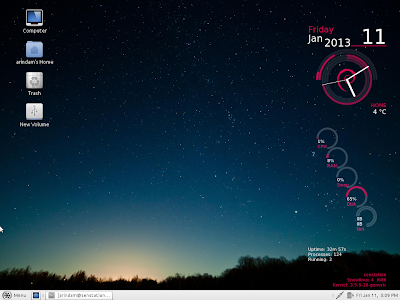
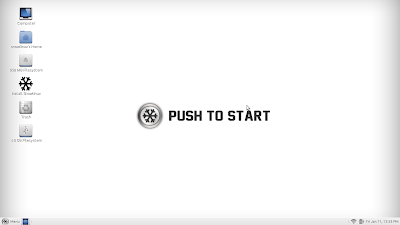
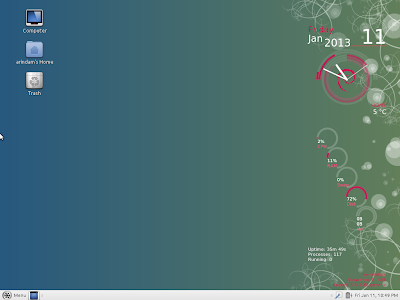
Snowlinux Glacier has a changed wallpaper from all 2012 releases, with white background and a tag "Push to Start" - looks nice. But, it doesn't gel with the white themed Mate. On selecting a darker background, actually the desktop look elegant. I added a nice looking Conky (Conky Lua) to glamorize it further.
Long story short, Snowlinux desktop, as always, looks professional and elegant. Caja 1.4.0 is the default file manager and is fast to use. Sound and Wifi work out of the box - hardware detection is good, except for touchpad. The touchpad settings require to be manually configured and post manual intervention, toucpad works as expected.
Applications
Though Snowlinux has applications by default to cover most of the basic needs but the app section left me bit disappointed. I'll tell you why later. The list below sums up the essential apps present in Snowlinux 4, and it is not much different from Crystal or White releases, namely:
Installation
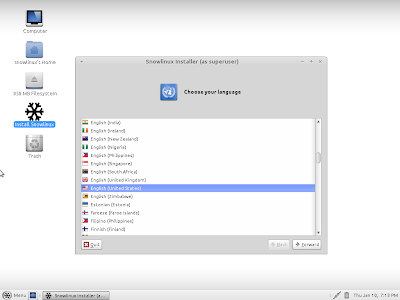
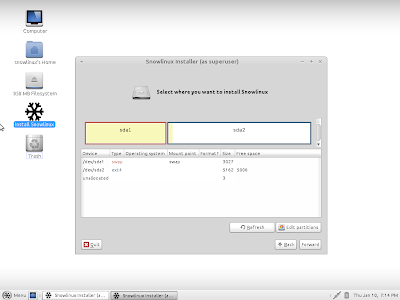
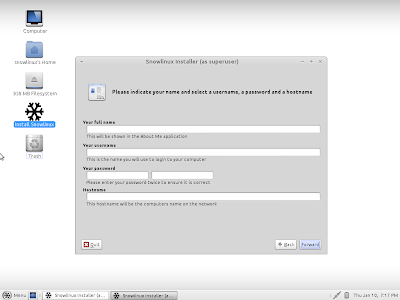
Installation is like Ubuntu and it takes about 30 minutes of time, if updates are selected for downloading. Steps are pretty simple: Language, time-zone, Keyboard language and type, preferred username and password and finally selection of the location to install. That's it - pretty simple!
Repository
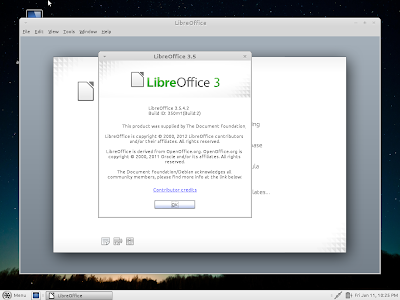
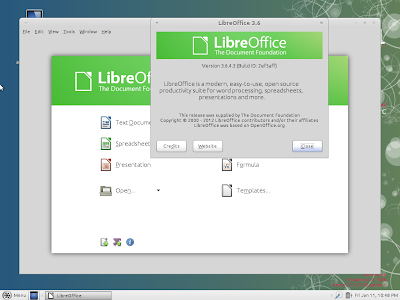
Snowlinux sources applications from Debian Wheezy repo and uses Synaptic package manager as the GUI. Synaptic works well and fast, as expected. However, I was a bit disappointed on the repo contents. Already LibreOffice 3.6 suite is out for quite sometime and almost every other distro is offering it as the basic office application. I checked the repo, even there LibreOffice 3.5 is the most updated version! Same with GIMP - entire world is playing with 2.8 and the Debian repo has 2.6 to offer! Seems like quite a bit of backdated apps in the repo.
How to update with the latest Linux softwares?
Now here I came up with my own way of installing GIMP 2.8, LibreOffice 3.6 and Skype 4. I added Ubuntu Precise and Mint Nadia ppa's to the repository list in Synaptic! You can add Quantal as well. Doing it is pretty simple, as you can see from the pictures below.
Once added I just refreshed the repo and I could see the latest versions of GIMP, Skype and LibreOffice. For LibreOffice, I uninstalled 3.5 and then installed 3.6 from the Ubuntu repository. Installing GIMP 2.8 wasn't a pain as there was no installed version of GIMP. Similarly, I installed Skype and checked that it was working fine with Snowlinux Mate.
Post installation of the required applications, I ran into a bit of issues as "apt-get update" reported of broken packages (possibly downloaded from Ubuntu repo while installing these applications). So, I unchecked all the extra Mint and Ubuntu repo I had added and then did an update. Now everything ran fine and I didn't see any instability in last 5 days.
Performance
Mate 1.4 is very low on resources and consumes 1-5% CPU and 147 MB RAM to load the desktop GUI, with task manager running. Now that is equivalent to using an XFCE desktop! If I compare it to other Mate distros, Snowlinux wins hands down - it consumes the least resources of the Mate distros I tested. All performance estimates below are from 32-bit versions and tested on the same machine, post installation, with task manager running.
 |
| From Snowlinux 4 Glacier Mate 1.4 |
I downloaded the 32-bit ISO, about 980 MB, in size and did a live boot on my Asus K54C, 2.2 Ghz Core i3 with 2 GB RAM. Post live boot I installed Snowlinux on an 8 GB drive dedicated for Linux OS testing. My assessments shared below are based on its performance post installation.
 |
| From Snowlinux 4 Glacier Mate 1.4 |
Snowlinux Glacier has a changed wallpaper from all 2012 releases, with white background and a tag "Push to Start" - looks nice. But, it doesn't gel with the white themed Mate. On selecting a darker background, actually the desktop look elegant. I added a nice looking Conky (Conky Lua) to glamorize it further.
 |
| From Snowlinux 4 Glacier Mate 1.4 |
 |
| From Snowlinux 4 Glacier Mate 1.4 |
Applications
Though Snowlinux has applications by default to cover most of the basic needs but the app section left me bit disappointed. I'll tell you why later. The list below sums up the essential apps present in Snowlinux 4, and it is not much different from Crystal or White releases, namely:
- Office: LibreOffice 3.5 Suite with suitable alternatives for MS Word, Excel, Powerpoint, Access and Math, Dictionary, Document viewer
- Internet: Firefox 17, Pidgin, Transmission, Thunderbird 17
- Graphics: Eye of Mate Image Viewer, Shotwell Photo Manager, Simple Scan Brasero, Movie Player, Rhythmbox
- Accessories: Archive Manager, Calculator, Pluma, Root terminal, Terminal, Screenshot
 |
| From Snowlinux 4 Glacier Mate 1.4 |
Installation
Installation is like Ubuntu and it takes about 30 minutes of time, if updates are selected for downloading. Steps are pretty simple: Language, time-zone, Keyboard language and type, preferred username and password and finally selection of the location to install. That's it - pretty simple!
 |
| From Snowlinux 4 Glacier Mate 1.4 |
 |
| From Snowlinux 4 Glacier Mate 1.4 |
 |
| From Snowlinux 4 Glacier Mate 1.4 |
 |
| From Snowlinux 4 Glacier Mate 1.4 |
 |
| From Snowlinux 4 Glacier Mate 1.4 |
 |
| From Snowlinux 4 Glacier Mate 1.4 |
 |
| From Snowlinux 4 Glacier Mate 1.4 |
Snowlinux sources applications from Debian Wheezy repo and uses Synaptic package manager as the GUI. Synaptic works well and fast, as expected. However, I was a bit disappointed on the repo contents. Already LibreOffice 3.6 suite is out for quite sometime and almost every other distro is offering it as the basic office application. I checked the repo, even there LibreOffice 3.5 is the most updated version! Same with GIMP - entire world is playing with 2.8 and the Debian repo has 2.6 to offer! Seems like quite a bit of backdated apps in the repo.
 |
| From Snowlinux 4 Glacier Mate 1.4 |
 |
| From Snowlinux 4 Glacier Mate 1.4 |
Now here I came up with my own way of installing GIMP 2.8, LibreOffice 3.6 and Skype 4. I added Ubuntu Precise and Mint Nadia ppa's to the repository list in Synaptic! You can add Quantal as well. Doing it is pretty simple, as you can see from the pictures below.
 |
| From Snowlinux 4 Glacier Mate 1.4 |
Once added I just refreshed the repo and I could see the latest versions of GIMP, Skype and LibreOffice. For LibreOffice, I uninstalled 3.5 and then installed 3.6 from the Ubuntu repository. Installing GIMP 2.8 wasn't a pain as there was no installed version of GIMP. Similarly, I installed Skype and checked that it was working fine with Snowlinux Mate.
 |
| From Snowlinux 4 Glacier Mate 1.4 |
 |
| From Snowlinux 4 Glacier Mate 1.4 |
 |
| From Snowlinux 4 Glacier Mate 1.4 |
 |
| From Snowlinux 4 Glacier Mate 1.4 |
 |
| From Snowlinux 4 Glacier Mate 1.4 |
 |
| From Snowlinux 4 Glacier Mate 1.4 |
Post installation of the required applications, I ran into a bit of issues as "apt-get update" reported of broken packages (possibly downloaded from Ubuntu repo while installing these applications). So, I unchecked all the extra Mint and Ubuntu repo I had added and then did an update. Now everything ran fine and I didn't see any instability in last 5 days.
Performance
Mate 1.4 is very low on resources and consumes 1-5% CPU and 147 MB RAM to load the desktop GUI, with task manager running. Now that is equivalent to using an XFCE desktop! If I compare it to other Mate distros, Snowlinux wins hands down - it consumes the least resources of the Mate distros I tested. All performance estimates below are from 32-bit versions and tested on the same machine, post installation, with task manager running.
| Linux OS (32-bit) | Desktop | CPU Usage (post installation) | RAM usage (post installation) |
| Mint 13 Debian Cinnamon/Mate | Mate 1.2 | 1-5% | 190 MB |
| Mint 13 Mate | Mate 1.2 | 1-5% | 207 MB |
| Mint 14 Mate | Mate 1.4 | 1-5% | 200 MB |
| Snowlinux 3 White Mate | Mate 1.4 | 1-5% | 240 MB |
| Snowlinux 4 Glacier Mate | Mate 1.4 | 1-5% | 147 MB |
Overall
I really like the Glacier release of Snowlinux. It works real smooth and is light on resources. The desktop looks a bit bland to start with but is user-friendly and supports customization. Applications are a bit old in the distro but, as I showed, it supports the Linux Mint and Ubuntu Quantal backports and latest applications can be installed in Snowlinux without any pain at all.
I absolutely recommend Snowlinux 4 for it's low resource consumption, customization options and compatibility with Linux Mint and Ubuntu repositories. If you are a Gnome fan and looking for something light in Gnome, Snowlinux 4 is the perfect distro for you.
You can download Snowlinux 4 from here. Both 32 and 64 bit versions are available.
Read more!
