Showing posts with label Utopic Unicorn. Show all posts

Saturday, November 22, 2014

Ubuntu Mate 14.10 Review: For GNOME 2 lovers and offers awesome performance

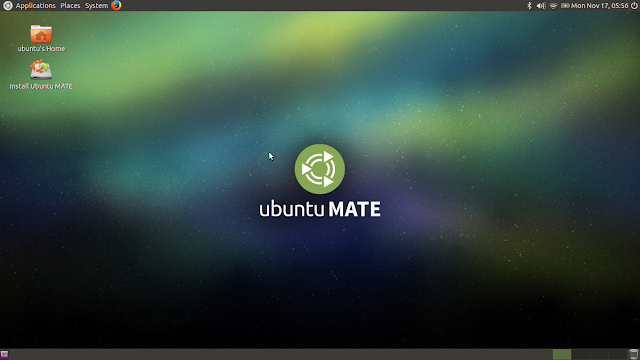
I am not sure if Ubuntu Mate 14.10 is an official release from Canonical yet. It is still to be listed in distrowatch. But, never-the-less I came across this distro as a reference from a couple of readers from my blog. I used the distro for a week and I am writing down my experience with the distro. It has the same specifics as Ubuntu 14.10 - the desktop environment is different here: Mate 1.8.1, with it's typical GNOME 2 looks.

From Ubuntu Mate 14.10 http://mylinuxexplore.blogspot.in
For this review, I downloaded the 1 GB 64-bit ISO from the Ubuntu Mate website for this review. I used Linux Mint Image Writer to create a live USB and used it to install on my favorite Asus K55VM laptop.

Read more!

Sunday, November 9, 2014

Xubuntu 14.10 "Utopic Unicorn" Review: Looks great but slightly disappointed with performance

XFCE is my favorite desktop environment for all for being lightweight and ability to support customization. Generally Xubuntu or Linux Mint XFCE always satisfied my requirement. Hence, with that expectation I checked out the brand new Xubuntu release, nicknamed "Utopic Unicorn". The release note doesn't say any radical change except for some incremental improvements, namely:
"The Xubuntu team is pleased to announce the immediate release of Xubuntu 14.10. To celebrate the 14.10 code name 'Utopic Unicorn' and to demonstrate the easy customisability of Xubuntu, highlight colors have been turned pink for this release. You can easily revert this change by using the theme configuration application under the Settings Manager; simply turn Custom Highlight Colors 'Off' and click 'Apply'. Of course, if you wish, you can change the highlight color to something you like better than the default blue. Starting with Xubuntu 14.10, you should use pkexec instead of gksudo for running graphical applications with root access from the terminal for improved security."
What is new in Xubuntu 14.10?
  • New Xfce Power Manager plugin is added to the panel
  • Items in the newly themed alt-tab dialog can now be clicked with the mouse
  • Starting with Xubuntu 14.10, you should use pkexec instead of gksudo for running graphical applications with root access from the terminal for improved security
  • Linux kernel updated to 3.16, enhanced support for the latest Intel CPUs (Cherryview, Haswell, Broadwell and Merrifield systems), initial support for Nvidia GK30A and GK110B GPUs and enhanced audio support for ATI Radeon devices
  • Updated Packages, like Ubuntu 14.10
I downloaded the 979 MB 64-bit ISO and created a live USB using Linux Mint Image Writer. I did a live boot on my Asus K55VM laptop and installed it on a 250 GB partition.

Read more!

Sunday, October 26, 2014

Ubuntu 14.10 "Utopic Unicorn" Review: Very similar to Ubuntu Trusty Tahr!

"Once upon a time" - every story my 4 year old daughter would narrate, starts with this sentence. And while penning down a review of Ubuntu Utopic Unicorn, I was also thinking the same. Once upon a time, every new release of Ubuntu meant excitement of something new, something very radical and innovative and something worth trying out. LTS or no LTS, every release was worth upgrading those days and I would inevitably ditch the old release and upgrade.

But, day have changed and Linux is moving toward more stability or is it the lull before a storm? I am not sure. With that prelude I start my review where I document my initial experience with Ubuntu's brand new release, Ubuntu 14.10 named "Utopic Unicorn". The release note states a host of improvements for the server version but very few for the desktop or home user version.
"Ubuntu 14.10, the latest desktop release is today available for download from Canonical. This release focuses on the developer experience, overall quality, and brings a number of important features and security enhancements. The Ubuntu desktop continues to be intuitive, easy to use and reliable for users all over the world. Ubuntu is a popular choice for developers targeting the cloud, mobile or devices because it is easy to use, fast and secure. Ubuntu 14.10 introduces the first iteration of the Ubuntu Developer Tools Centre, which makes it even easier to develop on Ubuntu. It downloads all the Android toolkits and their dependencies and integrates them with the launcher in a single command. This is first available for Android and will soon extend to other platforms such as Go and Dart."
From Ubuntu 14.10 http://mylinuxexplore.blogspot.in

What is new in Ubuntu 14.10 for normal users like us?
Let me start with what's new in Ubuntu 14.10 for a casual home user like me. The following are the new points:
  1. No Unity 8 or Mir,  or systemd, still with Unity 7.3.1 and Xorg 1.16 server
  2. Linux kernel updated to 3.16, enhanced support for the latest Intel CPUs (Cherryview, Haswell, Broadwell and Merrifield systems), initial support for Nvidia GK30A and GK110B GPUs and enhanced audio support for ATI Radeon devices
  3. Home and videos icon changed in Files 3.10.1
  4. Updated LibreOffice and GNOME components
    • LibreOffice 4.3.2.2
    • Firefox 33
    • Thunderbird 33
    • Files 3.10.1
    • Evince 3.14
    • Rhythmbox 3.0.3
  5. Ubuntu web browser works far better now with a normal address bar at the top. 
Read more!