With Fedora 18 release in Jan 2013, I see increase in interest on Fedora distros in my friends circle. Almost everybody wants to know between Fedora and Ubuntu - who offers better proposition? Well, honestly, there is no straight forward, definitive answer and both command a significant number of dedicated users. As you see, both Ubuntu and Fedora gives birth to scores of derivatives and are held in high regard in the Linux world. Ubuntu itself is derived from Debian and Fedora from Redhat. In this article I attempted to document and compare my experience with both the distributions and I leave it to the readers to decide.
 I pick here Fedora 18 Gnome, KDE, XFCE and LXDE to compare with Ubuntu, Kubuntu, Xubuntu and Lubuntu (all 12.10 release). The reason for me to compare all 4 desktop interfaces is to make holistic comparison. The results showcased here are based on my testing, done between Nov'12 to Feb'13 on my Asus K54C laptop, Core i3 2.2 Ghz processor with 2 GB RAM. My assessment is based on Installation, Aesthetics, Hardware Recognition, Applications and Performance. Intentionally, I exclude the repository here as majority of the commonly used applications have both deb and rpm versions.
Read more!
Fedora has always intrigued me to keep track of the latest happenings in the Linux world and especially what's brewing at the RHEL stable! Also, if I think of a comparable distro to Ubuntu, Fedora is the only legitimate choice! Just like Ubuntu, Fedora also inspires innumerable spins (like Kororaa, Fuduntu, of which I am a big fan now!). So, when the release note of Fedora came on 15th Jan, I was quick to download all the four versions (Gnome, KDE, XFCE and LXDE). This is the first review of the series and I start with the Gnome spin.
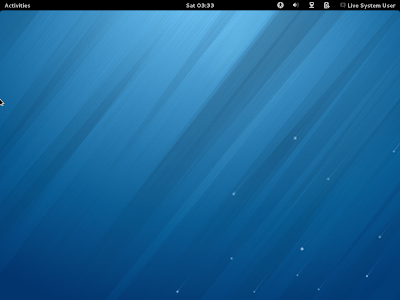
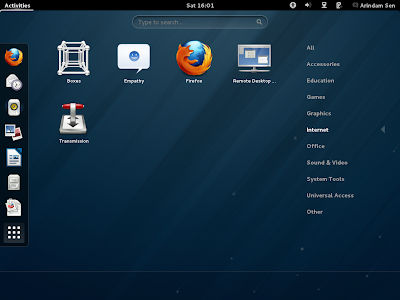
My assessment is based on installation in Asus K54C laptop with 2.2 Ghz Core i3 processor and 2 GB RAM and using it for last 5 days. I used the 932 MB 32 bit ISO for this purpose. Fedora 18 has the stock Gnome 3.6 desktop interface and this version has got the poweroff button back! Removing the shut-down button was insane and good that the developers of Gnome realized it! The desktop looks clean and professional I must say. However, Gnome 3 interface is not yet very intuitive to me, for example, changing a simple wallpaper takes quite a bit of steps whereas on any other desktop environment it is just a matter of simple right click! Same with simple minimization of open windows or closing an open window. Life is quite complex at Gnome 3, I suppose. Usual vices of Gnome 3 is there with this release of Fedora as they are with other stock Gnome 3 based distros. I haven't used Gnome 3 much lately, and using Gnome 3 on a daily basis made me even like Unity! People who read my blog regularly know how much I dislike Unity - Gnome 3 is worse.
Anyway, enough cribbing of Gnome 3 and back to Fedora 18. The downloaded ISO has Linux kernel 3.6.10 which upgrades to 3.7.2 upon installation. The default file manager is Gnome Files 3.6.3. Hardware detection is at par with any other top notch Linux OS - resolution is perfect, sound card detected with ease, touchpad works with enabling touchpad option from mouse settings, Wifi and LAN detected immediately.
One interesting feature I saw is the live-boot or install options while USB live-boot. Seems like Fedora picked up a feather or two from Ubuntu! It is good option for the users and I am not complaining!
Applications
Fedora 18 provides users with quite a few of the essential applications, viz.
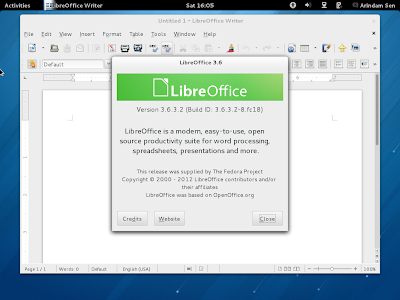
- Office: LibreOffice 3.6 Calc, Writer, Impress, Draw, Dictionary & Document viewer
- Internet: Empathy, Firefox 17, Remote Desktop, Transmission, Evolution mail & Calendar
- Graphics: Image viewer, Shotwell, simple scan
- Multimedia: Brasero, Cheese, Rhythmbox, Totem Movie Player 3.6.3
- Accessories: Archive Manager, Calculator, Clocks, Contacts, Disks, Documents, Files, gedit, Password manager, Screenshot, Terminal
- Others: Boxes
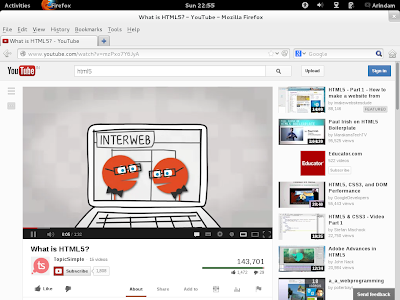
More or less a Fedora has a healthy list of applications. Firefox is the default browser but there is no Adobe flashplugin support out of the box. Html5 works, however, effortlessly. I could watch youtube videos where html5 option is available, right after installation.
However, it just takes couple of minutes to actually download the latest Adobe Flash plugin RPM packages and make them work in Fedora 18, namely:
1. Adding Adobe RPM packages to Yum (as root):
rpm -ivh http://linuxdownload.adobe.com/adobe-release/adobe-release-i386-1.0-1.noarch.rpm
rpm --import /etc/pki/rpm-gpg/RPM-GPG-KEY-adobe-linux
2. Update and then download Adobe flash
yum check-update
yum install flash-plugin nspluginwrapper alsa-plugins-pulseaudio libcurl
Fedora doesn't have the restricted multimedia codecs installed. Fedora or Red Hat doesn't ship those as a policy. A little bit of research and Rpmfusion came to my rescue. I entered the following command at the terminal to add RPM fusion packages:
su -c 'yum localinstall --nogpgcheck http://download1.rpmfusion.org/free/fedora/rpmfusion-free-release-18.noarch.rpm http://download1.rpmfusion.org/nonfree/fedora/rpmfusion-nonfree-release-18.noarch.rpm'
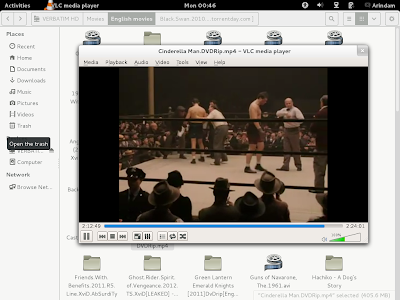
Post submitting this command, a refresh of the Software Install showed me the non-free codecs as well as VLC. Imagine the plight before this, neither movie files (.avi & .mkv primarily) nor mp3s would play on Fedora, even though Totem movie player and Rhythmbox are present!
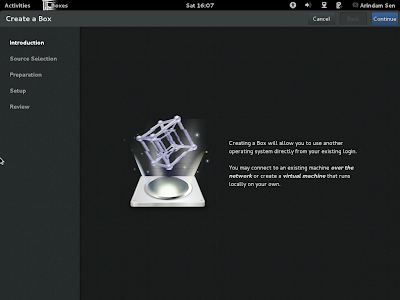
Another application that caught my attention is the Boxes. It is actually a lightweight Gnome virtualbox, similar to the more famous Oracle Virtualbox. I didn't try it for this review but will try it sometime in future.
Application-wise Fedora 18 is moderately rich and I give it a score of 8.25/10. The score distribution is given below:
| Fedora 18 Gnome |
Score |
| App – Office |
10.00 |
| App – Internet |
8.00 |
| App – Graphics |
7.00 |
| App – Multimedia |
8.00 |
| Applications |
8.25 |
Given no Adobe flashplugin in either the distro or in the repository, I have given 8/10 in internet section. Otherwise, Fedora satisfy my criteria of a browser, chat client, email client and bit torrent client. In graphics, given there is no photo editor like GIMP, I gave 7/10. In multimedia, as there are no restricted codecs present even in the repo, Fedora 18 got 8/10 though a music player and a video player is present.
Installation
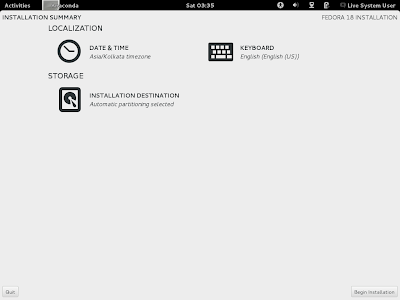
One of the main attraction of the Fedora 18 is the modified Anaconda installer. At a high level, it seems pretty simple and comparable to the Ubuntu installer. Just answer a few questions about language, location, keyboard, set root password, create user and that's it! No silly questions on grub and where to install grub, etc. just like Ubuntu. However, the design is a bit questionable and the orange notices popping up below every now and then is a bit irritating. At times I am not sure if I am doing the right thing or the wrong thing! The screeshots below have a mix of Gnome & KDE installation, as I forgot to take some snapshots from Gnome installation.
The installer is a bit bland in look and design. It is possibly designed keeping in mind the tablets and touch interfaces. But, it makes life a little tough on conventional laptops and desktops.
Life becomes more complicated with the installer once I try to create my own partition scheme and install Fedora. The installer is not very intuitive or as good as gparted. Moving on, straight forward installation takes about 20 minutes of time and it doesn't download the updates or codecs while installation like Ubuntu. I guess that makes life a bit tougher for any new user.
Post installation about 260 MB of updates were downloaded. I used terminal for the same with command "sudo yum update && sudo yum upgrade".
Repository
Yum is the default package manager with gpk-application 3.6.1 as the GUI for browsing and installing packages. As mentioned before, the stock Fedora repo isn't that rich in terms of non-free codecs or applications. I couldn't locate even Adobe flashplugin there! But, once I added RPM Fusion packages to it, things became a lot better. Interface of gpk-application is similar to synaptic and even here the gpk apps tells of the dependencies required to be installed as pre-requisites. If you don't want to go into complexities of the GUI, life is quite simple via the terminal as well, simply type "sudo yum install appname" and your app will get installed in minutes.
Some of the apps like Adobe flashplugin or Skype 4.1 are not there even in the RPM Fusion repo and required to be installed downloading from the respective website. For Skype, I tried the Fedora 16 installer available on Skype website and it worked well resolving all dependencies on Fedora 18.
Performance
Post updating to Linux kernel 3.7.2, Fedora 18 Gnome desktop consumed about 310-320 MB RAM and 1-10% CPU to load with system monitor running. I guess, it is pretty decent if I compare it to the latest Gnome 3 spins released in 2012-13. Fedora 18 resource consumption is almost equivalent to Fedora 17 and Ubuntu 12.04.1 LTS. If I compare it to Ubuntu 12.10, Fedora 18 comes way better.
| Linux OS |
Desktop |
CPU |
RAM |
| Ubuntu 12.04.1 LTS |
Unity with Gnome 3.4 |
1-10% |
280 MB |
| Fedora 17 Gnome |
Gnome 3.4.1 |
1-10% |
296 MB |
| Zorin 6 Core |
Gnome 3.4.1 |
1-10% |
300 MB |
| OpenSUSE 12.2 Gnome |
Gnome 3.4.2 |
1-10% |
310 MB |
| Fedora 18 Gnome |
Gnome 3.6.2 |
1-10% |
310 MB |
| Pinguy OS 12.04 |
Gnome 3.4.1 |
1-10% |
325 MB |
| Ubuntu 12.10 |
Unity with Gnome 3.6 |
1-10% |
412 MB |
Overall
I like Fedora 18 Gnome for it's clean, uncluttered interface. But, Gnome 3 is too much to digest for me to use. Actually Ubuntu Unity works much better, even though I hate it being inefficient. Now actually I understand why Ubuntu is pursuing Unity and Linux Mint is going aggressive on Cinnamon. However, I don't have much complain on the Fedora spin - they tried to be true to Gnome 3 desktop and it worked really well on my Core i3 laptop. It is fast, slick and I found it quite stable. I have mixed feelings about the upgraded Anaconda installer - it's good in patches but I felt, it is primarily designed for tablets. I guess the big distros like Ubuntu & Fedora will go aggressive to tap the tablet PC market pretty soon. Desktop users will have to be contended with Fedora/Ubuntu spins like Linux Mint, Fuduntu, Kororaa, etc.
Do I recommend Fedora 18 Gnome? I'll recommend it for advanced users who can take the pain for installing a new distro every year. For casual users, looking for a stable distro but love Fedora, try other flavors of Fedora like KDE. And if you can't live without Gnome, try Fuduntu instead. It work much better and has a rolling release with Gnome 2.32 desktop. Life is much easier and intuitive in Fuduntu.
Fedora 18 Gnome gets a rating of 8.35/10 from my side for being a solid stable distro with slick professional looks and good performance, but with Gnome 3 agonies. The score distribution is given below:
| Fedora 18 Gnome |
Score |
Weights |
| Installation time |
10.00 |
5% |
| Installation Complexity |
8.00 |
5% |
| Hardware detection |
10.00 |
10% |
| Applications |
8.25 |
20% |
| Aesthetics & Usability |
7.00 |
30% |
| Performance & Stability |
9.00 |
30% |
| Overall |
8.35 |
100% |
You can download the 32 and 64 bit editions from here.
Read more!